Archives

How to Unlock & Program Toyota Land Cruiser VXR V8 Smart key

Guide to unlock and program smart key on a 2016 Toyota Land Cruiser VXR V8 5.7 4×4.

how-to-unlock-program-toyota-land-cruiser-vxr-v8-smart-key-1

The solution was provided by a Chinese locksmith A Jie.


Problem:

A customer bought a Toyota Cruiser VXR V8 5.7 in Aug, 2016. When came back home he found one of keys did not working, could not start the vehicle. He came me for help.


Diagnose:

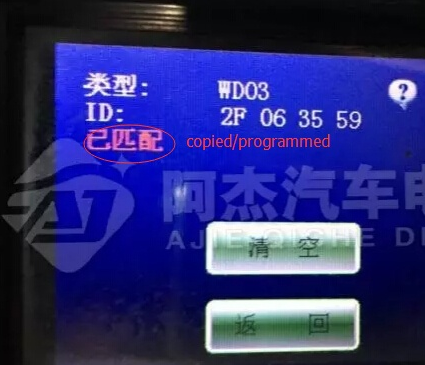
Check the key frequency and chip type with ND900 key copy machine. It showed key’s programmed, so the smart key is okay.
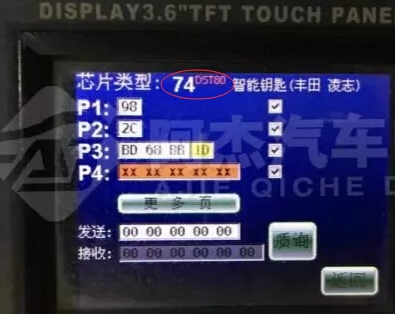
how-to-unlock-program-toyota-land-cruiser-vxr-v8-smart-key-2

how-to-unlock-program-toyota-land-cruiser-vxr-v8-smart-key-3

Analysis:

1. The smart key has been programmed but not been learned

2. 4S store gave you the wrong key (the key is not for this vehicle)


How to check:

Method 1:

Program/learn the smart key by using SKP1000 tablet car key programmer. Unfortunately, skp-1000 failed to learn key. So the smart key is not correct key for this vehicle.  You should get the smart key unlocked and programmed. Go and check method 2.


Method 2:

Step 1: Unlock Smart key

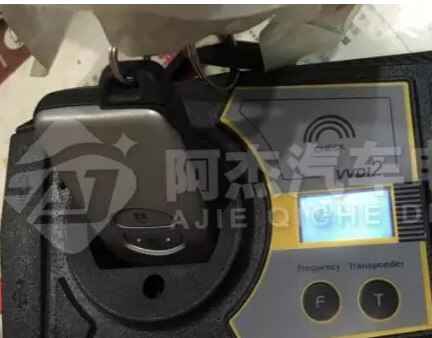
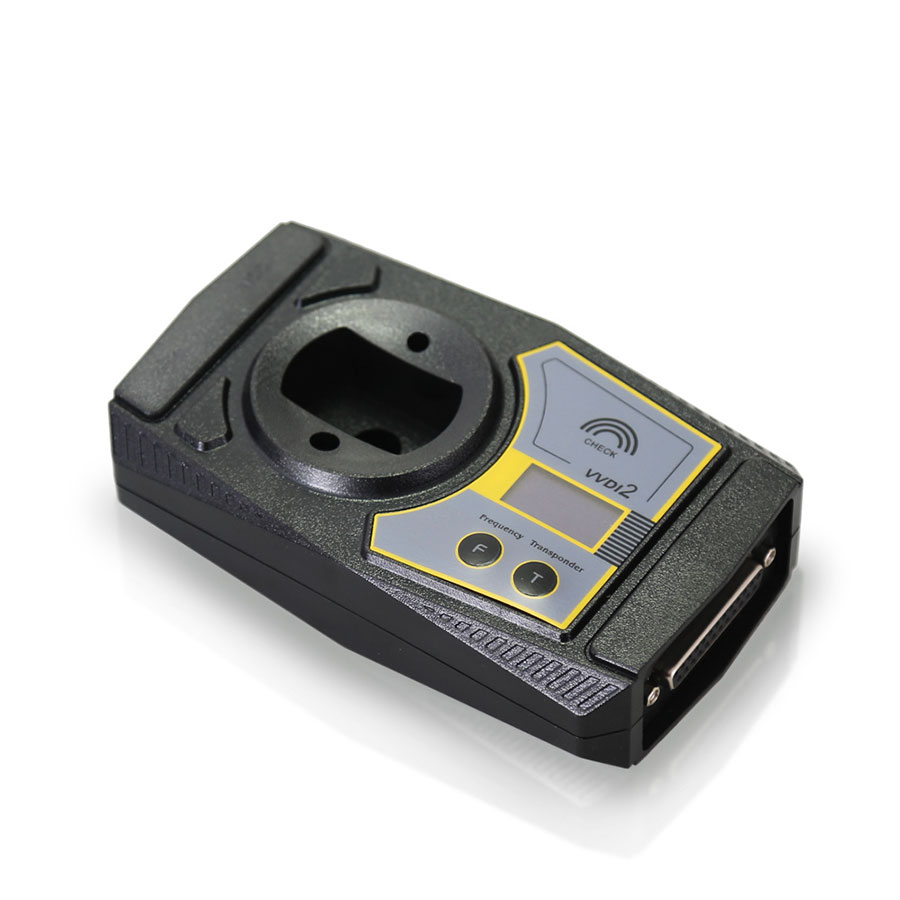
Unlock the smart key with Xhorse VVDI2 key programmer or ND900 Mini
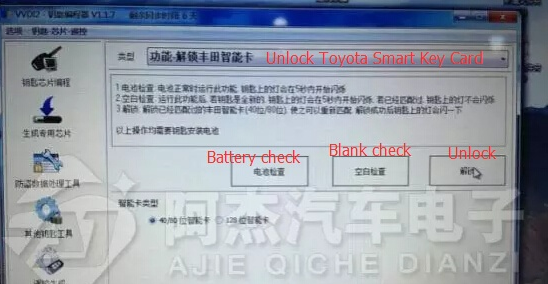
how-to-unlock-program-toyota-land-cruiser-vxr-v8-smart-key-4

how-to-unlock-program-toyota-land-cruiser-vxr-v8-smart-key-5

Perform Blank Check,  key indicator will flash within 5 seconds if VVDI2 unlock success
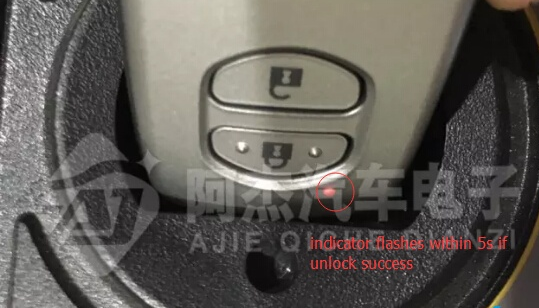
how-to-unlock-program-toyota-land-cruiser-vxr-v8-smart-key-6

Again use ND900 to check the unlocked smart key.

It shows not been programmed
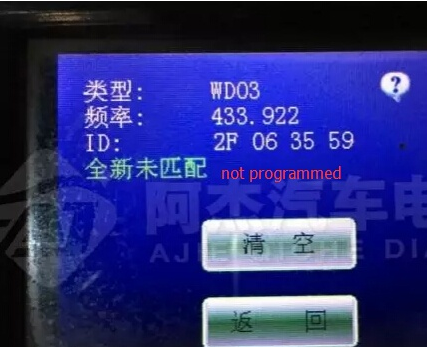
how-to-unlock-program-toyota-land-cruiser-vxr-v8-smart-key-7

Unlock smart key done.


Step 2: Add/Program smart key 

Connect SKP1000 key programmer with vehicle via OBD socket

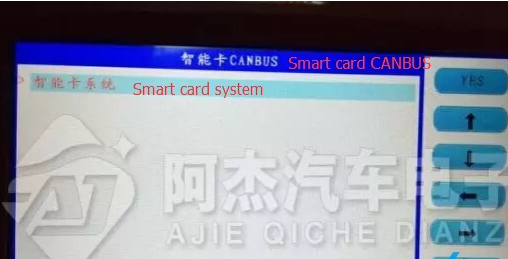
Select Immobilizer function- >select Toyota->Smart key CANBUS-> Smart key system

how-to-unlock-program-toyota-land-cruiser-vxr-v8-smart-key-8

how-to-unlock-program-toyota-land-cruiser-vxr-v8-smart-key-9

how-to-unlock-program-toyota-land-cruiser-vxr-v8-smart-key-10

Choose OBDII connector

Turn ignition ON

Press YES to continue

how-to-unlock-program-toyota-land-cruiser-vxr-v8-smart-key-11

Press the Start button

how-to-unlock-program-toyota-land-cruiser-vxr-v8-smart-key-12

Put the registered smart card into coil.

If hear a beep sound, take away the smart card
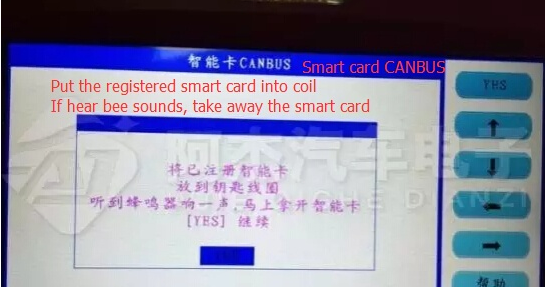
how-to-unlock-program-toyota-land-cruiser-vxr-v8-smart-key-13

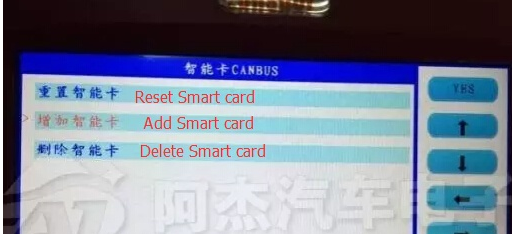
Select Add smart key

how-to-unlock-program-toyota-land-cruiser-vxr-v8-smart-key-14

the working key is close to the emergency starting induction antenna
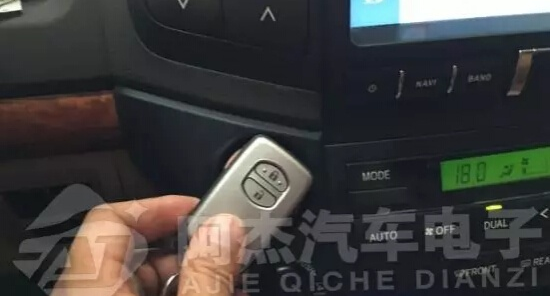
how-to-unlock-program-toyota-land-cruiser-vxr-v8-smart-key-15

Change a new smart key and put it into the coil

Press YES to continue
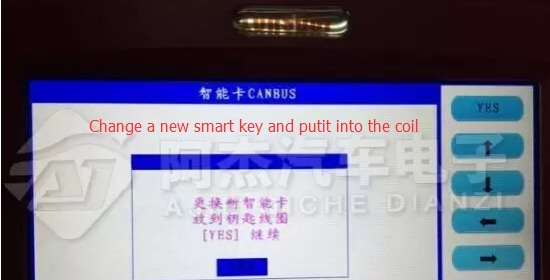
how-to-unlock-program-toyota-land-cruiser-vxr-v8-smart-key-16

the new smart key is close to the emergency starting induction antenna
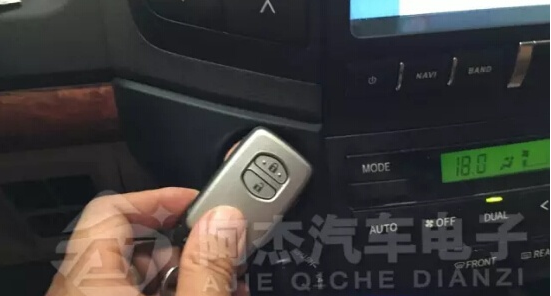
how-to-unlock-program-toyota-land-cruiser-vxr-v8-smart-key-17

Configuring…

how-to-unlock-program-toyota-land-cruiser-vxr-v8-smart-key-18

Program/Add smart key success

how-to-unlock-program-toyota-land-cruiser-vxr-v8-smart-key-19

Test the new smart key.
VVDI2 BMW V4.3.0 FEM BDC key program & KM reset tested 100% works

VVDI2 BMW V4.3.0 FEM BDC key program & KM reset tested 100% works

VVDI2 latest software version V4.3.0 update: BMW V4.3.0 adds BMW FEM/BDC key learn, erase key, FEM/BDC KM reset etc. Below parts incl. VVDI2 BMW FEM /BDC authorization, update content, free download link and using tips.

VVDI2 BMW V4.3.0 FEM/BDC system function is optional, the supplier could help you in the authorization of VVDI2 FEM / BDC, you could contact email at: Sales@CarOBD.de for a best price and after-sale service.

  1. Xhorse VVDI2 Key Programmer BMW FEM/BDC Function Authorization Service (with mini condor key cutting machine)
  2. Xhorse VVDI2 Key Programmer BMW FEM/BDC Function Authorization Service (without mini condor key cutting machine)

VVDI2 BMW V4.3.0 Update:

*** Require firmware V4.3.0

VVDI2 BMW V4.3.0 Capabilities:

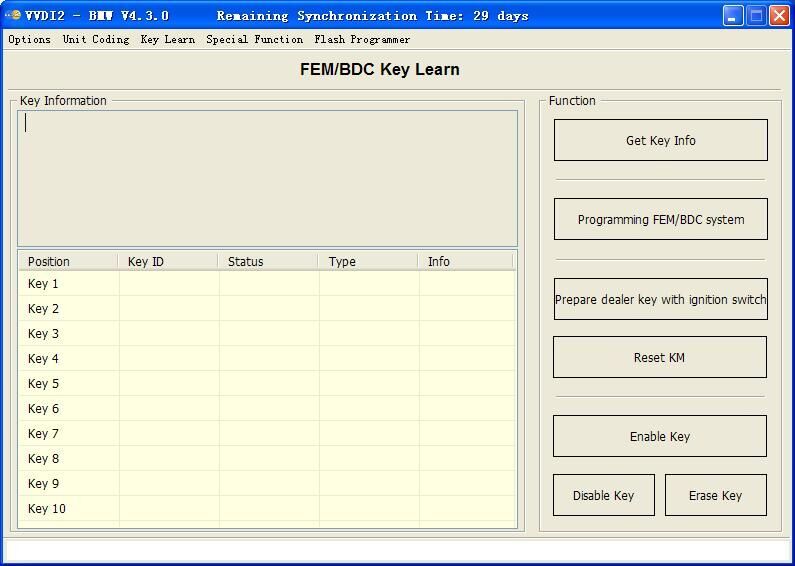
1.support make new key with ignition switch(support adding spare key and all key lost, all key lost require ISN)

2.support reset FEM/BDC KM(cluster require reset manually)

3.support erase key(after erasing the key position become blank position)

4.support backup coding

5.support restore coding

vvdi2-program-bmw-fem-bdc-key-user-instruction-step-by-step-2

vvdi2-program-bmw-fem-bdc-key-user-instruction-step-by-step-1

VVDI2 V4.3.0 download free:
https://mega.nz/#!W1pSRRTL!0n8OX4wshaB1s0O06SDhTR0KvO32nPHZWg4CQjBMdrA

The user who have VVDI2 interface with BMW software could update SW and FW self directly, only connect your VVDI unit internet and press update FW and SW…

VVDI2 BMW V4.3.0 make FEM BDC keys in 3 steps: get key info->programming FEM/BDC system->make keys

Tips:
1.backup coding and restore coding can direct operation generally.
2.add keys, reset KM, erase key must programming FEM/BDC system first
3.in FEM/BDC interface, if ‘get key info’ the type not support, it will show: customer should use “BMW E-sys software” program FEM/BDC system. then programming FEM/BDC system with VVDI2-BMW
4.when operation on ‘programming FEM/BDC system ‘interface, please don’t close this software window until all procedures completed.
5.programming FEM/BDC system, require soldering and get eeprom.(FEM 95128 chip, BDC 95256 chip)usually there are 2 same chips on the module, please refer to the software diagram, select the correct one.
6.programming FEM/BDC system, must restore the original eeprom, restore coding.if cannot restore coding or after restore coding assemble FEM/BDC module back to car, but with problem (such as the remote control cannot start the car
or the car with window problem)please use “BMW E-sys software” coding for FEM/BDC system.


VVDI2 program BMW FEM BDC key user instruction step by step

Post includes 3 parts: 1. Authorization of VVDI2 FEM /BDC key program & KM reset functions (with & without Condor Mini) . 2. VVDI2 programs BMW FEM BDC capabilities 3. VVDI2 programs BMW FEM BDC key step by step instruction.


  1. Authorization of VVDI2 FEM /BDC key program & KM reset functions

Tools to have: VVDI2 full version or VVDI2 with BMW OBD function


1) with Condor Mini 510 EUR

Requirement: provide VVDI2 and Condor(HKSL273 or SL255) serial NO.


2) without Condor Mini 680 EUR

Requirement: provide VVDI2 serial NO.


  1. VVDI2 programs BMW FEM BDC capabilities

1.support make new key with ignition switch(support add spare key and all key lost, all key lost require ISN)

2.support reset FEM/BDC KM(cluster require reset manually)

3.support erase key(after erase the key position become blank position)

4.support backup coding

5.support restore coding


3. VVDI2 program BMW FEM BDC key step by step instruction

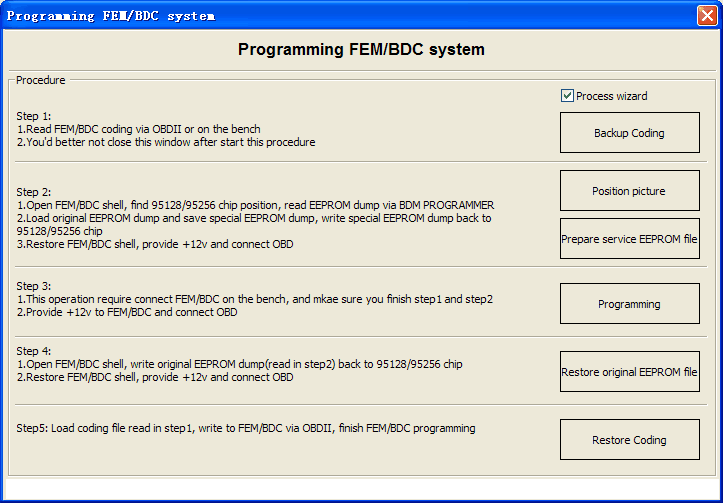
step 1:

  1. read FEM/BDC coding via OBDII or on the bench
  2. you’d better not close this window after starting this procedure


step 2:

  1. open FEM/BDC shell, find out where the 95128/95256 chip is, read EEPROM dump via BDM programmer
  2. load original EEPROM dump and save special EEPROM dump, write special EEPROM dump back to the 95128/95256 chip
  3. Restore FEM/BDC shell, provide -12v and connect it via OBD


step 3:

  1. this operation requires connecting FEM/BDC on the bench, and make sure you finish step 1 ans step 2
  2. provide +12v to FEM.BDC and connect it via OBD


step 4:

  1. open FEM/BDC shell, write original EEPROM dump (read step 2) back to the 95128/95256 chip
  2. restore FEM/BDC shell and connect it via OBD


step 5:

loading coding file (read step 1), write to FEM/BDC via OBDII, finish FEM/BDC programming

Attach two pictures:

vvdi2-program-bmw-fem-bdc-key-user-instruction-step-by-step-1

vvdi2-program-bmw-fem-bdc-key-user-instruction-step-by-step-2

HandyBaby Hand-held update to new version 8.3.0!

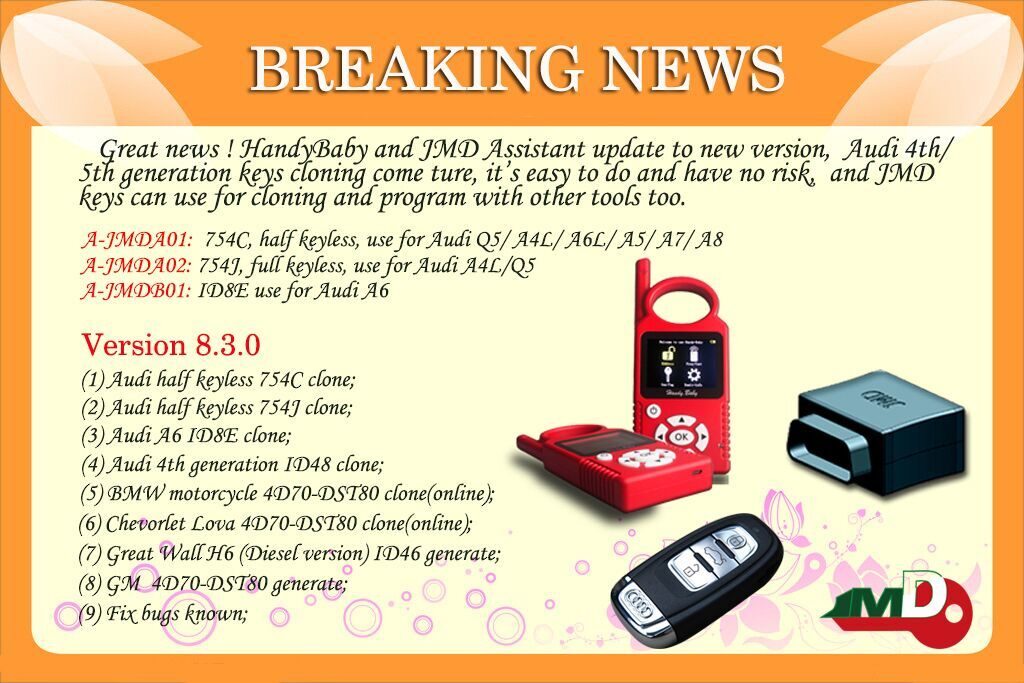
Handy Baby Hand-held Car Key Copy Auto Key Programmer update to version 8.3.0! Audi 4th/5th generation keys cloning come true, it’s easy to do and have no risk, and JMD keys can use for cloning and program with other tools too.

A-JMDA01: 754C, half keyless, use for Audi Q5/A4L/A6L/A5/A7/A8

A-JMDA02: 754J,full keyless, use for Audi A4L/Q5

A-JMDB01: ID8E use for Audi A6

Handy Baby Version 8.3.0 :

http://www.carobd.de/wholesale/cbay-hand-held-auto-key-programmer.html

To know more about new version 8.3.0, view the image below:

cbay-hand-held-auto-key-programmer-pic-1

YH BMW FEM key programmer read out 18 versions successfully

YH BMW FEM key programmer Test Report:

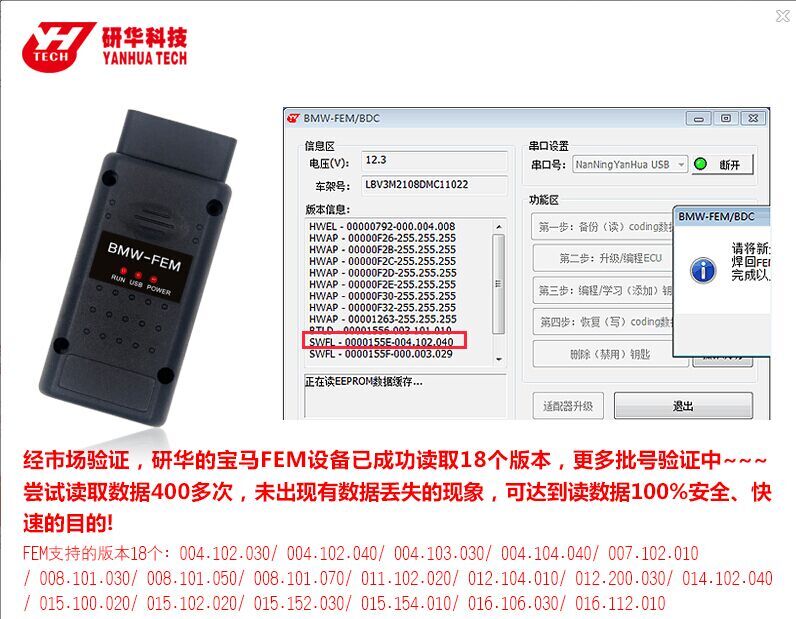
Read out 18 versions with success , more are verified… (It’s 100% confirmed by Yanhua engineers)

yanhua-bmw-fem-key-programmer-pic-1

Tried to read data for 400 times and all success without data loss. So YH BMW FEM key programmer read data 100% safe and fast.

FEM supported 18 versions as below:

004.102.030

004.102.040

004.103.030

004.104.040

007.102.010

008.101.030

008.101.050

008.101.070

011.102.020

012.104.010

012.200.030

014.102.040

015.100.020

015.102.020

015.152.030

015.154.010

016.106.030

016.112.010

NEW! Yanhua BMW FEM Key Programmer Coming (free for D3 users)

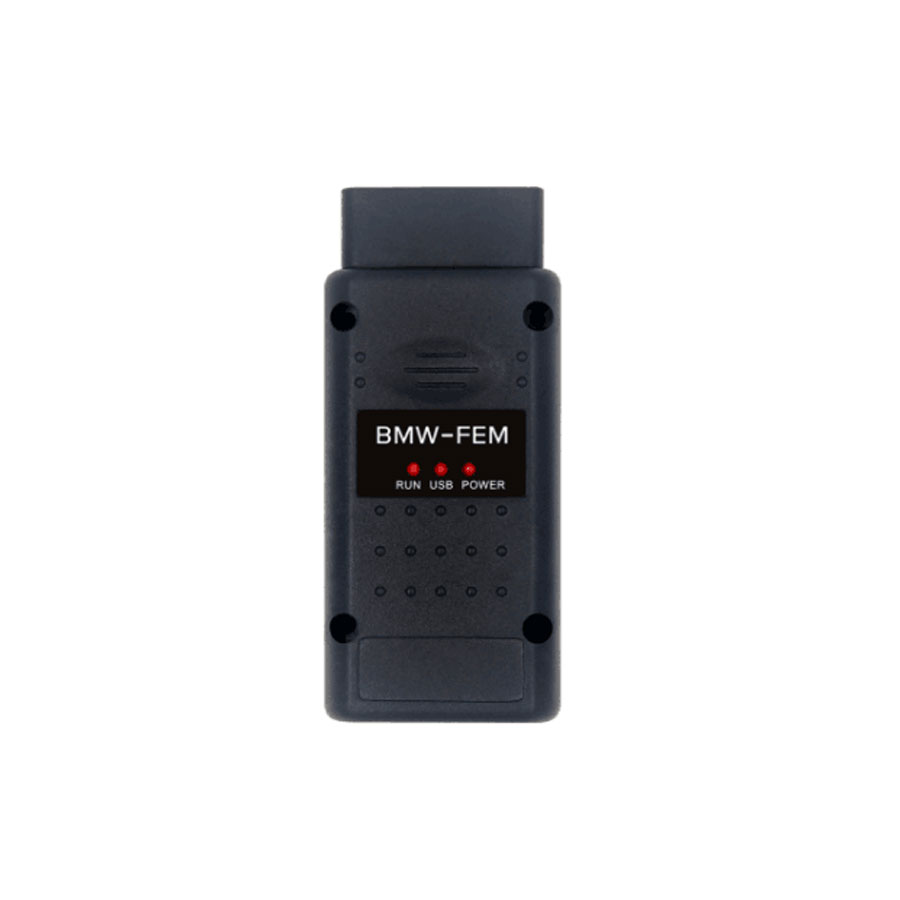
New! Yanhua BMW FEM Key Programmer is newly released at caobd.de, it is able to program BMW FEM keys up to 2017 year.

yanhua-bmw-fem-key-programmer-1

Yanhua BMW FEM Key Programmer coverage (Up to 2017 year):

1 Series             F20/F21                    2011-2017

2 Series             F22/F23/F45/F46            2014-2017

3 Series/GT          F34/F35                    2012-2017

4 Series             F30/F31/F32/F33/F36        2014-2017

X5                   F15                        2014-2017

X6                   F16                        2015-2017

How to use Yanhua BMW FEM Key Programmer?

  1. allows offline operate with easy and stable.
  2. Need no tokens

so, don’t you think it is easy to operate.

Update: update on Yanhua official site http://www.autoemaster.com/

Where to get one Yanhua BMW FEM Key Programmer?

Not from Yanhua official site, but from the authorized dealer especially the one deal in Yanhua products for many years e.g. www.carobd.de. If you are preparing charging 500 tokens for Digimaster 3, this adapter is free of charge.

2017 SKP1000 Tablet Key pro compare with Superobd SKP900

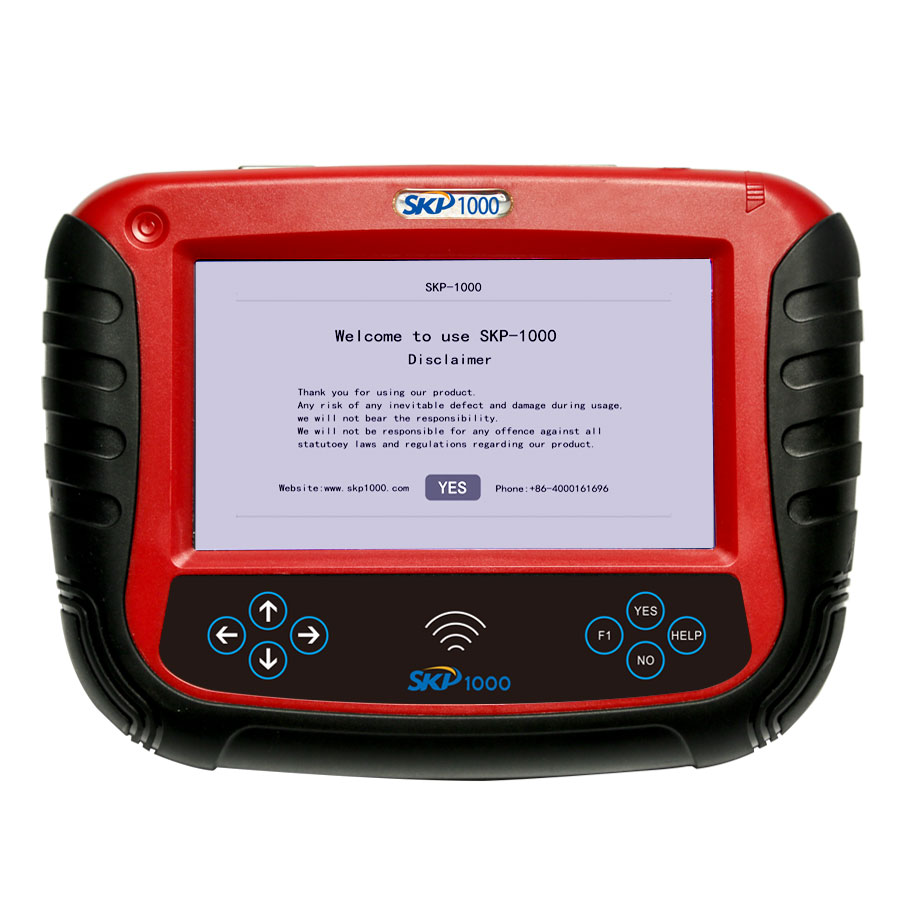
Newest 2017 SKP1000 Tablet Key pro claims to replace Superobd SKP900. That means SKP1000 can do what SKP900 does and can do more that SKP900 cannot do. Reading below comparison table  about their similarities and differences.

SKP1000 Key pro          Superobd SKP900
MUX skp1000-tablet-auto-key-programmer-a120 superobd-skp-900-180
Back Design skp1000-tablet-auto-key-programmer-a4 superobd-skp-900-hand-held-hand-held-key-programmer
Capability key programming + special functions key programming
OBD mileage adjustment Yes No
remote controller Yes No
oil/service reset Yes No
ETC Yes No
EPB Yes No
EEPROM chip read Yes No
Pin code calculation Yes, support more models than SKP900, i.e Ford and Nissan Yes, support a little part models
Support BMW Enable/disable the key Enable/disable the key
Support Benz Enable/disable the key Enable/disable the key
Software Update Support Support
Firmware update Support Support
Newest car coverage Yes Yes, if it always updates
with touch pen Yes No
with Haima 7pin adapter Yes No
with power adapter Yes No
with TF card Yes No
with TF card reader Yes No


Attach more:

SuperOBD SKP-900 SKP900 key pro car list

SKP1000 Tablet Key pro car list & user manual

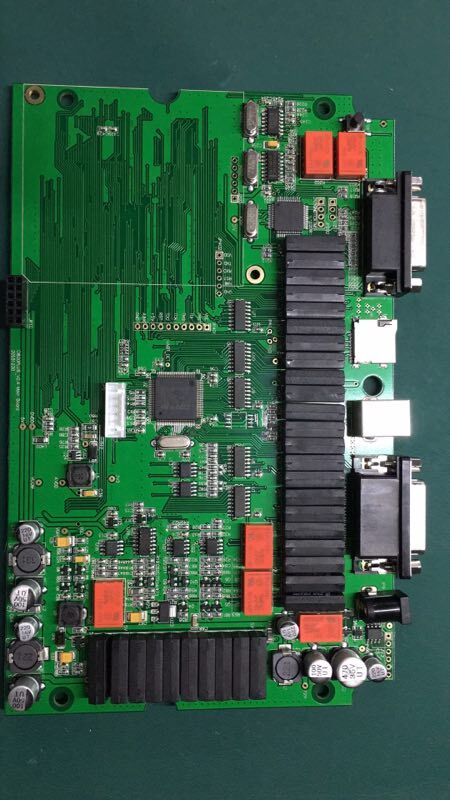
SKP1000 PCB display:

skp1000-tablet-auto-key-programmer-pic-1.2

skp1000-tablet-auto-key-programmer-pic-1.3


To sum up, SKP1000 Tablet Key pro wins

– in multifunction

– in user-friendly design (with stand at the back, 1* touch pen 1* Haima 7pin adapter, 1* power adapter, 1* TF card, 1* TF card reader)

– in Newest vehicles

– In Firmware update


SKP1000 Key Programmer Best Price: Amazon or Ebay?

Topic: SK1000 best price

skp1000-tablet-auto-key-programmer-pic-13

Where to buy Lonsdor SK1000 auto key programmer at the best price & of high quality?

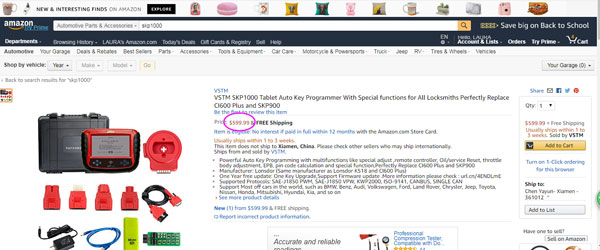
SK1000 key programmer Amazon: $599.99

skp1000-tablet-auto-key-programmer-pic-1

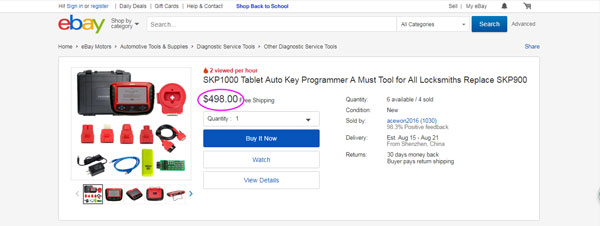
SK1000 key programmer Ebay: $499.00

skp1000-tablet-auto-key-programmer-pic-2

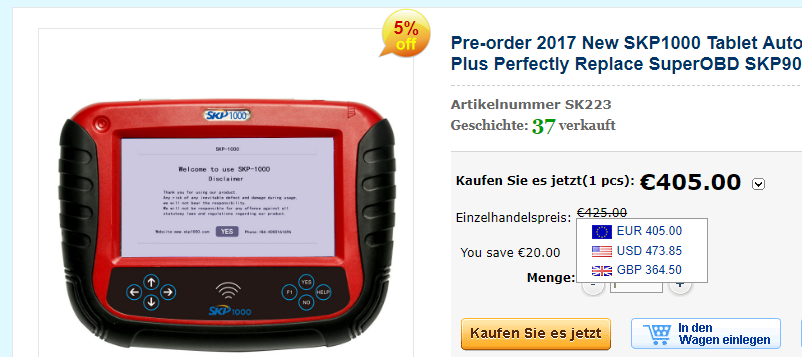
SK1000 key programmer at carobd.de: 405 EUR, that is $473

skp1000-tablet-auto-key-programmer-pic-3

Source: http://www.carobd.de/wholesale/skp1000-tablet-auto-key-programmer.html


Sk1000 features:


Clear key memory
Program keys, proximity keys, smart key, flip keys;
Program after-market and OEM keys;
Read keys from immobilizer memory
New mechanical key number programming;
Vehicle identification key programming;
Reset ECU& Reset immobilizer;
New remote controller programming;
Immo PINCODE reader for many vehicles

no need pincode when programming keys for many vehicles
Mileage adjustment via OBD;
With full and strong database for the most important vehicle makes
Remote assistance
EEPROM chip read and immobilizer initialization;
EPB(Electric park brake);
throttle body adjustment
Oil/Service reset;
EEPROM/PIC adapter


SKP1000 car list:

http://www.carobd.de/wholesale/skp1000-tablet-auto-key-programmer.html


SKP1000 user manual:

http://www.carobd.de/upload/pro/201707/skp1000-user-manual.rar


V4.2.5 VVDI2 Commander Key Programmer Latest Update and Free Downlode

VVDI2 Key Programmer latest software V4.2.5 update(2017-08-10)
vvdi2-key-programmer-21

VVDI2 V4.2.5 Software Download for Free
*** Require firmware V4.2.6

===== VAG V4.2.5   =====
1. Add Polish language support
2. Improvement for flash updating (for frf files)
3. Support decode kessy for Touareg, Bentley, A8, Cayenne, Phaeton after 2008
1). You must read kessy data with VVDI-PROG (version above V4.5.9)(IMMO-VW-Kessy(2008-  )
2). Load the file read by VVDI-PROG in vvdi2, you will get the PIN code and 7 bytes CS
3. Bugfix for immo5 lost all key with A6, A7, A8, Touareg
4. Support read A6/Q7 latest J518(4F0910852B H08 0210) with 9S12DT256 module
5. Improvement for “Lost all key via OBDII”
6. Bugfix

===== BMW V4.2.5   =====
1. Add Polish language support

===== Porsche V4.2.5   =====
1. Add Polish language support

===== PSA V4.2.5   =====
1. Add Polish language support

===== Transponder Programmer V4.2.5 =====
1. Add Polish language support
2. Support the latest remote type
3. Immobilizer data tool: bugfix for olvo Trucks FH12(93C66)
4. Immobilizer data tool: bugfix Brilliance Zunchi 93C46
5. Immobilizer data tool: bugfix Fiat Marea 93C46
6. Immobilizer data tool: bugfix BMW CAS3+ encrypt type
7. Immobilizer data tool: bugfix Fiat Linea 2007 95160
8. Immobilizer data tool: bugfix Mitsubishi Outlander 2009 24C16
9. Immobilizer data tool: bugfix for suzuki vitara 2006- 93C56
10. Bugfix for input chinese words in feedback window
11. Bugfix

===== J2534 V4.2.5   =====
1. Add Polish language support

===== Online Upate Tool V4.2.5  =====
1. Add Polish language support
===== Quick Start V4.2.5   =====
1. Bugfix

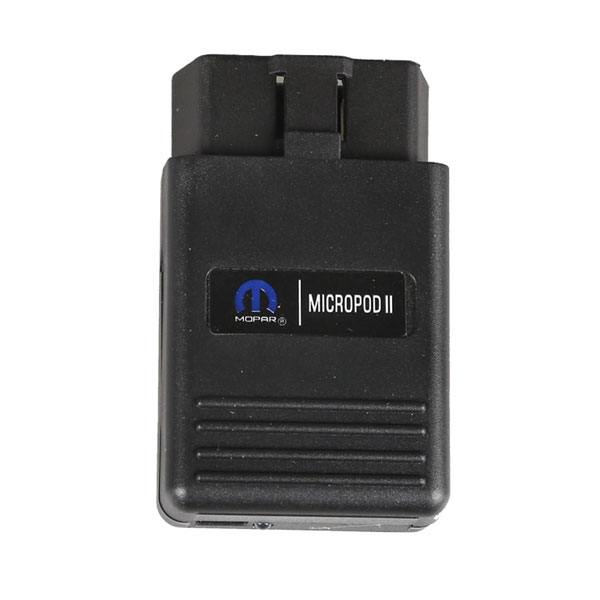
wiTech MicroPod 2 V17.04.17 Windows 7 download: 100% Tested!

wiTech 17.04.17 software crack download on Mega: worked on windows 7 32 bit or 64 bit

witech-micropod-ii-pic-2

https://mega.nz/#!Nm5QRQYR!fVPAE7SNtYa2iE5eqQaZ1zyW7A1nh94-vPGpK1Iu3lg

wiTech 17.04.17 java air download: necessary used with wiTech software v17

https://mega.nz/#!wOpgDZwa!IFV6QI0VF284bymAofBPut_TuUrX-9UN_8I1nj_kk8o


wiTech software v17.04.17 only work with MicroPod 2 clone with item no.sp271-c+sp271-s:

http://www.carobd.de/wholesale/witech-micropod-ii.html only 185 EUR


For wiTech MicroPod 2 ORIGINAL,HIGH RISK!!! FORGET IT


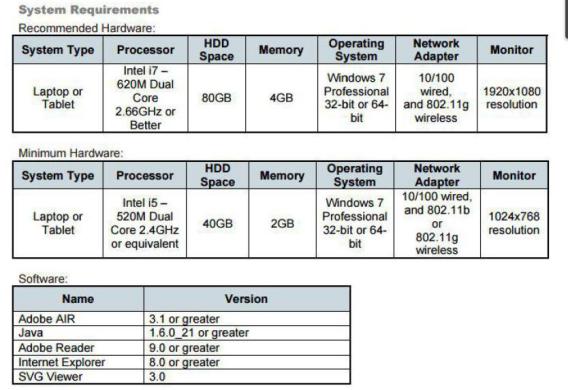
wiTech MicroPod System requirement:


Recommended hardware:

System type: laptop or tablet

Processor: intel i7 – 630M dual core 2.66GHz or better

HDD space: 80GB

Memory: 4GB

Operation system: Windows 7 professional 32 bit or 64 bit

Network adapter: 10/100 wired, 802.22g wireless

Monitor: 1920*1080 resolution


Minimum hardware:

System type: laptop or tablet

Processor: intel i5 – 520M dual core 2.4GHz or equivalent

HDD space: 40GB

Memory: 2GB

Operation system: Windows 7 professional 32 bit or 64 bit

Network adapter: 10/100 wired, 802.22g wireless

Monitor: 1024*768 resolution


Software:

Adobe air: version 3.10 or newer

Java: 1.6.0_21 or newer

Adobe reader: 9.0 or newer

Internet explorer: 8.0 or newer

SVG viewer: 3.0
witech-micropod-ii-pic-1

How to install wiTech MicroPod 2 V17.04.17 on Windows 7 32 bit or 64 bit:
1 Install AdobeAIRInstaller.exe
2 Install jre-6u45-windows-i586.exe
3 Install wiTECH_Install_17.04.27.exe
4 Restart the computer

WARNING for MicroPod 2 Setup:

1 The computer on the day of the date

2 The computer must be connected to the Internet

3 Connect the machine to the device and open the Chrysler wiTECH software

MicroPod 2 clone is ready for use!


What can you do with wiTech MicroPod 2 on Chrysler:


wiTech MicroPod 2 key programming:

  • You must be online to program the key.
  • The PIN Code is only good for one session, which lasts 72 hours. After 72 hours the pin code expires.
  • If you input the wrong code for three-time it locks the BCM and you cannot service the vehicle for 24 hours.
  • The key is one-time programmable. Once married to the vehicle it is locked to the car forever. The key can be erased from the car and put back into the same car, but can’t be switched to another car.
  • The placement of the key during initialization is important. It needs to be placed either behind the shifter or in the center console.

Have fun!