


Korhex Technical Guide: How to Position Your Korhex Correctly
Antenna Alignment, Contact Points & Positioning Mask – A Practical Step-by-Step Guide
Getting the best results from Korhex requires more than simply placing the device on the ECU.
Correct antenna alignment, accurate contact positioning and the proper use of positioning masks are essential parts of the setup process.
Even a small positioning error can affect the execution process and, in the worst case, cause irreversible damage to the microprocessor.
In this practical guide, we will explain how to position your Korhex correctly, what to check before operation and which common mistakes to avoid.
01. UNDERSTAND THE CORRECT ANTENNA ANGLE
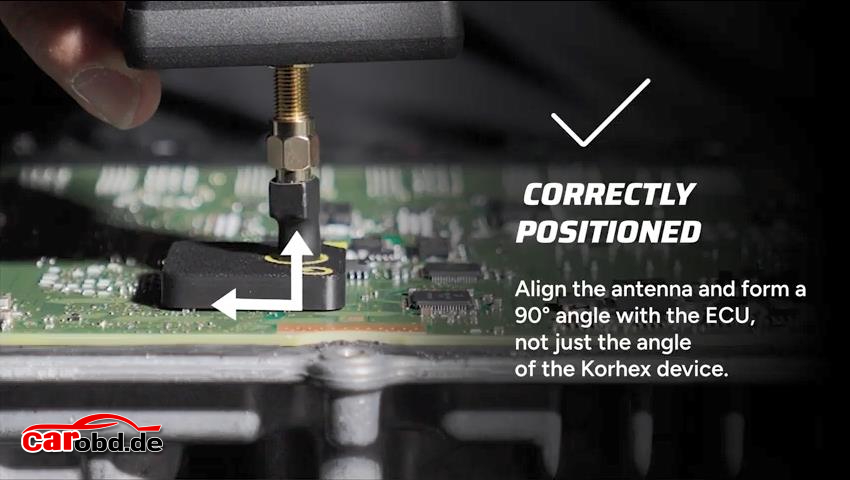
Align the Antenna at 90° to the ECU
One of the most important points is the actual orientation of the antenna.
The Korhex device body should be positioned perpendicular to the ECU. However, do not rely only on the angle of the device body.
The antenna itself must be correctly aligned with the ECU surface, forming a 90-degree angle.
What to Check:
Keep the Korhex device in the recommended position.
Check the actual orientation of the antenna.
Ensure the antenna is aligned at 90° to the ECU surface.
Do not assume that the device body angle automatically guarantees correct antenna alignment.
Important: Always pay attention to the antenna’s actual position, not just the appearance of the Korhex housing.
02. CHECK THE THREE ESSENTIAL POSITIONING POINTS
Before proceeding, make sure these three conditions are correct.
01 – Check the Angle
Verify that the antenna is correctly aligned at 90° to the ECU surface.
The actual antenna orientation matters more than simply checking the angle of the Korhex body.
02 – Check the Contact
Make sure the antenna is positioned at the intended contact point on the processor surface.
Incorrect contact positioning can affect the execution process.
03 – Check the Positioning
If execution is inconsistent, carefully verify the antenna alignment and positioning.
Use the positioning mask or the designated contact point indicated in the Flex software as a positioning reference.
03. HOW TO USE A POSITIONING MASK
Ensure Correct Mask Orientation
A positioning mask helps guide the placement of the Korhex antenna.
Before using it, check that the mask matches the intended ECU and is positioned correctly.
Important Guidelines:
Follow the designated mask positioning instructions.
Check the correct orientation before use.
Never turn the positioning mask upside down.
Make sure the mask is suitable for the intended processor and contact point.
Where Can You Get a Positioning Mask?
According to the video tutorial, positioning masks can be obtained in two ways:
Option 1 – Purchase a 3D-Printed Mask
Positioning masks can be purchased from the relevant supplier.
Option 2 – Print Your Own Mask
The STL file provided through Flex software can be used to produce a compatible positioning mask with a 3D printer.
Always verify that the selected mask corresponds to the correct ECU and positioning instructions.
04. POSITIONING WITHOUT A MASK
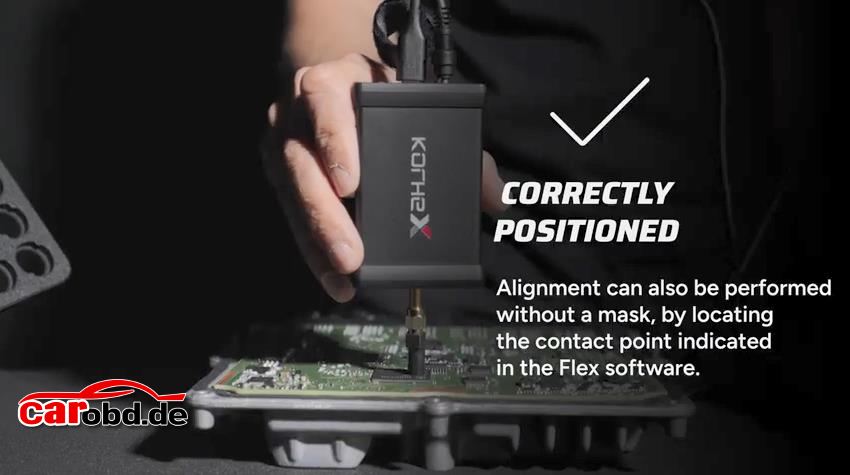
A positioning mask is not always required.
According to the video demonstration, alignment can also be performed without a mask by locating the designated contact point indicated in the Flex software.
When using this method:
Refer to the contact point displayed in Flex software.
Carefully verify the antenna position.
Ensure the antenna is correctly aligned with the intended processor surface.
Do not rely on visual estimation alone.
Always follow the specific positioning instructions for the ECU being worked on.
05. COMMON MISTAKES TO AVOID – THE DON’Ts
Avoid these three common positioning mistakes.
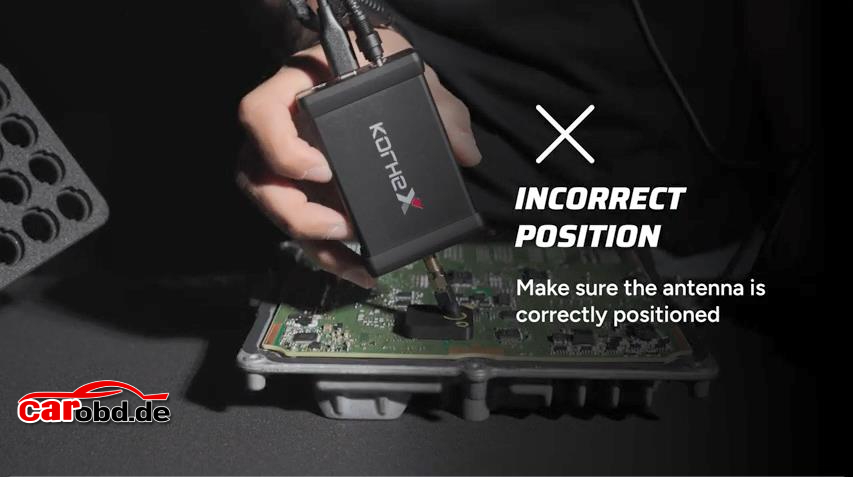
DON’T 01 – Tilt the Korhex Device
Keep the device perpendicular to the ECU according to the positioning instructions.
Do not tilt the device or assume that an angled position will provide correct antenna alignment.
DON’T 02 – Position the Mask Incorrectly
Always check the mask orientation before use.
Never turn it upside down or use a mask that does not match the intended ECU positioning instructions.
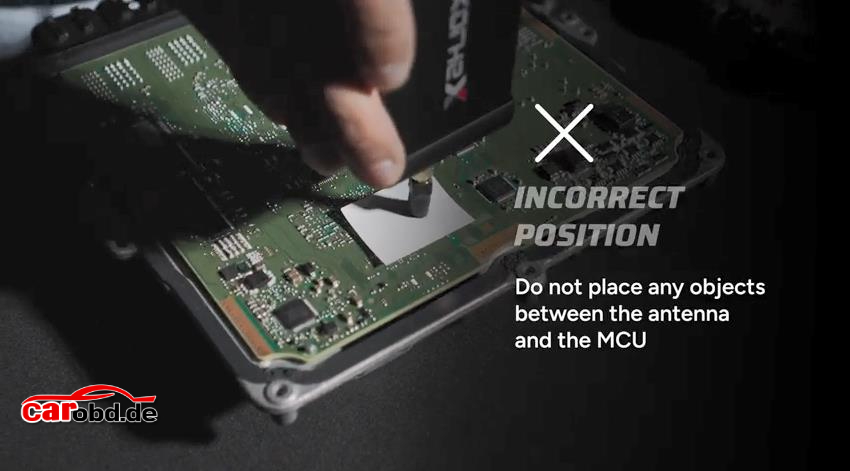
DON’T 03 – Place Objects Between the Antenna and MCU
Keep the area between the antenna and MCU clear.
Do not place additional objects between them, except for dedicated positioning masks designed for this purpose.
Unnecessary materials can interfere with the intended positioning.
06. QUICK PRE-OPERATION CHECKLIST
Before proceeding, take a moment to review the following points:
☐ Correct ECU and positioning instructions have been identified.
☐ The Korhex device is positioned correctly.
☐ The antenna is aligned at 90° to the ECU surface.
☐ The antenna is positioned at the intended processor contact point.
☐ The positioning mask is correctly oriented, if used.
☐ No unnecessary objects are placed between the antenna and MCU.
☐ The Flex software positioning reference has been checked when applicable.
☐ The setup has been carefully inspected before operation.
07. IMPORTANT SAFETY WARNING
Incorrect Positioning Can Cause Permanent Damage
Incorrect positioning is not just a performance issue.
As highlighted in the official video demonstration, incorrect positioning can cause irreversible damage to the microprocessor.
Always:
Verify the correct contact point before positioning.
Use the appropriate positioning mask or Flex software reference.
Check the antenna angle and alignment carefully.
Never force the device into an incorrect position.
Follow the specific technical instructions for the ECU being worked on.
If you are unsure about the correct positioning, stop and verify the instructions before proceeding.
FINAL TIPS: PRECISION IS EVERYTHING
Successful Korhex operation starts with accurate positioning.
Remember these three essential principles:
1. Correct Angle – Align the antenna at 90° to the ECU surface.
2. Accurate Contact – Position the antenna at the designated processor contact point.
3. Proper Positioning – Use the correct positioning mask or follow the Flex software reference.
A few seconds spent checking the setup can help prevent costly positioning mistakes.
IMPORTANT – READ BEFORE OPERATION
Incorrect antenna positioning may cause irreversible damage to the microprocessor. Always verify the correct ECU contact point, antenna alignment and positioning mask before proceeding.