Multilingual OTC GTS (IT3) Toyota Lexus Diagnostic Tool Compare with Intelligent IT2

New Arrival:

OTC GTS (IT3) Toyota Lexus diagnostic Tool is verified working fine, and newly released at www.cardiag.co.uk. After Toyota Denso Intelligent IT2, OTC GTS (IT3) brings Toyota Lexus technicians one more choice when they want to diagnose the Toyota Lexus.
toyota-global-techstream-gts-blog-1

Let’s firstly have an overview on OTC GTS (IT3) Toyota Lexus diagnostic Tool.

OTC GTS (IT3) Toyota Lexus diagnostic Tool outlook and adapters:

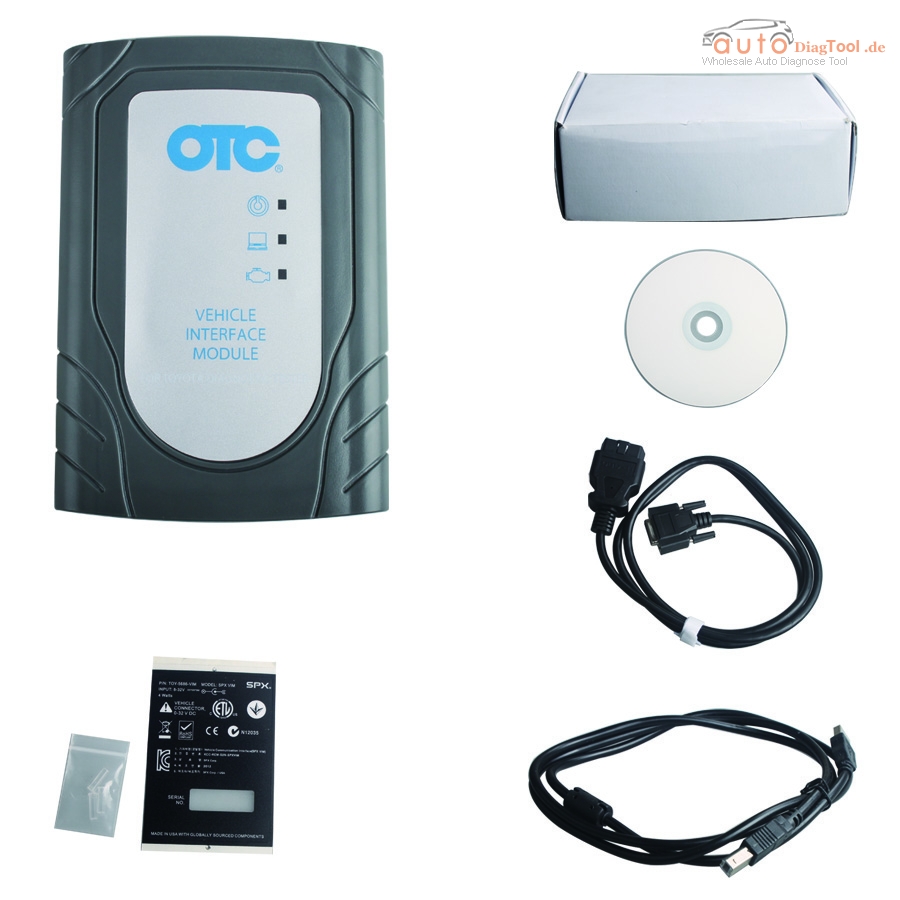
OTC GTS (IT3) package include: 1pcs x The OTC GTS host, 1pcs x OBD cable, 1pcs x USB cable and 1pcs x CD (contained driver and user manual).

You see GTS is a new PC-based diagnostic tool; it is built-in with no screen in the front of the multiplexer.

What is GTS? How it communicate with the vehicle?

GTS is a new PC-based diagnostic tool developed by Toyota Motor Corporation.GTS diagnostic tool is connected with its software and vehicle VIM. GTS software is the core part of this diagnostic tool and VIM is the communication between GTS and vehicle ECU. These will help technicians diagnose and reset vehicle’s program.

GTS Language available:

English, German, French, Spanish, Italian and Chinese

GTS (IT3) vehicle coverage:

Cover Toyota and Lexus up to 2015 year.

GTS Features and function:

”Legacy” module can work with all DLC3 (OBDII) port from 1993.

User-friendly graphical User Interface displays the trouble codes on the PC monitor, it is easy to understand.

GTS (IT3) compare with Intelligent IT2:

Item OTC/GTS Toyota Intelligent IT2
Toyota Lexus coverage Up to 2015 year Before 2012
With Oscilloscope and voltmeters No Yes
memory Larger than IT2 Less than OTC/GTS
Date Keeper <60 mins <15 mins
DTC Code Yes No
Monitored State Yes No
Health Report Yes No
Multisystem Yes No
Vehicle identification Yes No
Online Update Yes No
Logging System Yes No
OTC VIM installation

PC requirements:
Operating system (OS): WINDOWS XP/ VISTA/WIN7

CPU: Intel Pentium M1.2GHZ or higher

Memory: 1GB or more

Disk space: at least 256MB

Display resolution: 1024*768 (recommended) 1024*600 (lowest)

USB: at least one USB 2.0
Package including: 
1pcs x The OTC GTS host
1pcs x OBD cable
1pcs x USB cable
1pcs x CD

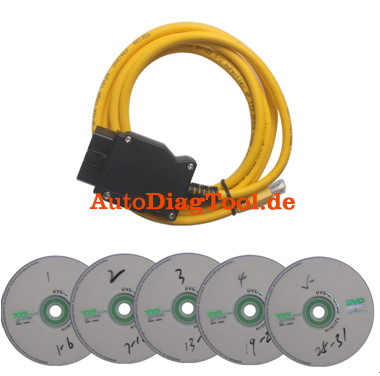
How to use BMW ENET cable to do BMW F-series coding

Received my BMW ENET cable and did some DIY job for F30 already.
This BMW ENET (Ethernet to OBD) Interface Cable is designed to work on BMW F-series alone. Let’s go straight to the point.

You need:
A BMW ENET cable
E-Sys program, datafiles, token and PIN
A PC/laptop running Windows XP system (mine second-hand Panasonic Win xp 64 bit OS)
Just spending a little money and you will get a powerful ENET cable for €11.00 without postage. I recommend get one from OBD Tools which offers good technical support. Usually, after he receives payment, they can have the cable shipped as soon as possible and arrive with you between 3 to 4 days.
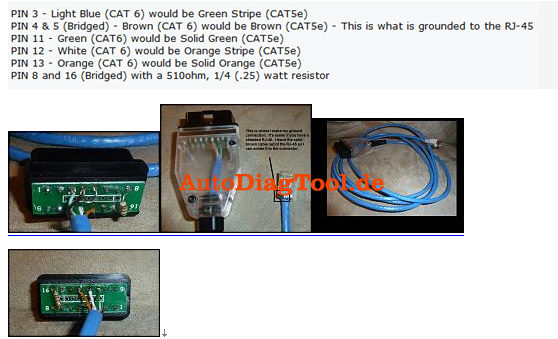
I have found some clue on how to solder the cable list as below. Better understanding with the pictures guidance.

BMW ENET cable
The package comes with E-Sys program, datafiles and such which enable me to use directly without downloading. I was offered E-Sys v3.18.4 in combination with the v46.3 datafiles. I have to mention that the datafiles contains more than 10GB memory, so you have to take hours and hours to download it all. And you have no choice but to wait patiently.

BMW ENET (Ethernet to OBD) Interface Cable E-SYS ICOM Coding F-Series


Then please refer the pdf guide here E-Sys – MacOSX installation and configuration.pdf to start install the E-Sys. As soon as you start the vehicle, the E-Sys program will automatically saves the CAF files into “C:ESysDataCAF”. Then copy all these files on to the certain folder.
After that, please do as the following steps:
1) Connect the laptop to vehicle and click the connect symbol
2) Select “F20”(not F020 direct) and click connect. Close the popping out message when you see your car VIN, if not, repeat the progress again.
3) Accept following windows message and close the program
4) Switch to coding mode, go to expert mode and click on coding icon on the left vertical pane.
5) Come to the coding program. Click Read button under the VO pane and then FA appears
6) Now Click on Read VCM or Read button under VCM pane. You will find it it will be on your right hand-Center
7) All the ECU’s will display on the main program. Then expand the ECU’s and all most all ECU’s will have a file starting with CAF (With green indicator) right click on the CAF file and select Read coding data, ignore whose who did not contain CAF. But remember do not click all CAF files. Four or five is the maximum.
8) After complete above procedures, go to c:/esydata/CAF. All the .ncd files have been generated on the CAF folder.
9) Copy .ncd files and on your pc or laptop. Run the software program and then start to do F30 coding according to the window instructions.
I have successfully realized these things by using the ENET cable:
–Remove PDC + cam disclaimer
– Mirrors open automatically when closed with comfort access
–Change DVD region code
– Remove disclaimer
– Video in Motion
– Turned the Seatbelt Gong off
– Side View Cameras on at all speeds
– Change DVD region code
– Tire pressure + temperature in TPMS
– Mirrors close by pressing doorknob (comfort access only)
– Disable A.S.S. by default (can still be enabled but starts with setting ‘off’)
– Remember last setting of A.S.S. (works only when not disabled by default)
– Change ringtones

I am still working on it and will figure out more functions later. I have to clearly that these are all the tested result on F30. I am not sure how other F-series works.

Foxwell NT500 VW Audi Seat Skoda scanner- more choice after 5054A

Foxwell NT500 VAG diagnostic scanner offers one more option for VW Audi Seat Skoda after vas5054a. Compare with vas5054a, Foxwell NT500 is not windows-based but handheld with 240*320 TFT color display, according to the customers’ feedback, it run quicker than our diagnostic computer.

Following parts are about Foxwell NT500 all details.

Foxwell NT500 main unit and adapters:

1 pc x NT500 VAG Scan Tool, 1 pc x Users Guide, 1 pc x Memory Card, 1 pc x USB Cable, 1 pc x Diagnostic Cable, 1 pc x Nylon Carry Pouch

Language:

English, Spanish and Chinese

Update:

SD memory card for data backup and software update

Foxwell NT500 workable car models:

Covers VW/Audi/Seat/Skoda sold worldwide from 1996, works with global OBDII/EOBD cars, SUVs, minivans, light-duty trucks.

Foxwell NT500 compatible protocols:

Compatible with the latest UDS protocol

Workable control system:

Engine, airbag, ABS, A/T, instrument cluster and so much more

Foxwell NT500 Volkswagen / Audi Scan Tool Video:

Foxwell NT500 what can do:

Reads and clear codes and turns off MILs

Requests and records live sensor data

Provides live data graphing

Merges graphs for easy and intuitive diagnosis

Displays freeze frame data

Performs active tests on vehicle systems and components

Performs special functions such as coding, security access, advanced datastream and so much more

Retrieves ECU information

Supports all 10 OBDII test modes, such as live data, O2 sensor test, component test and more

Resets oil service light

Sets inspection 1, 2 service interval

Sets (non) long life oil service

Sets inspection mileage

Deactivates and re-activates brake control system

Retracts calipers for brake pad replacement

Advances calipers after servicing to the original position without affecting the current calibration

Initializes the wear indicator if new pads installed

Diagnoses EPB caliper functionality

Resets the brake pad thickness after AUDI A8 service

Code troubleshooters provide you faster and easier diagnosis


Where to buy best Multidiag Pro+ for MAN, IVECO Trucks?

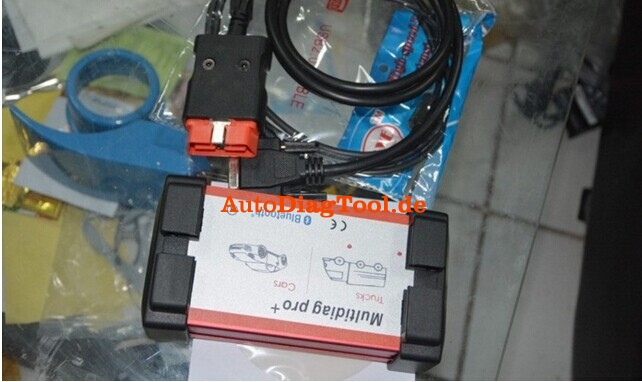
Today, I will guide you all to learn the best-quality Multidiag Pro+ at www.autodiagtool.de, for MAN, IVECO Trucks.

multidiag pro+

Multidiag Pro+ package:

Multidiag Pro+ interface

LED OBD2 Cable

USB cable (3 meter)

Software CD

Carrying Case

obd2-bluetooth-scanner-blog-1

obd2-bluetooth-scanner-blog-2

Multidiag Pro+ Test:

We test Multidiag Pro+ interface on many vehicles. Here Ford is one of them tested.


Multidiag Pro+ function:
FLIGHT RECORDER
With the flight recorder function, you can record parameters in real time while you are driving a vehicle. During recording, you can, with a press of a button, highlight the specific error so that you can investigate the detected error at a later time. CDP+ is equipped with built-in memory thus removing the need to bring a computer. Memory cart not include in package .

VOLTAGE CHECK
When CDP+ is connected to the vehicle, the unit will check the battery voltage of the vehicle and automatically adjusts itself to the vehicle’s voltage level of 12 or 24 volts. If the voltage gets too high or too low, CDP+ will warn you with both sound and light and you will also be alerted through the battery icon in our diagnostic software.

CHASSIS NUMBER VIN
In our CARS software, we have a smart function that allows you to read out the chassis number from the vehicle that you would like to diagnose. This ensures that the right model and year is selected automatically. In addition, engine code for vehicles, which are commonly available on the markets, is also selected automatically.

ISS
Intelligent System Scan (ISS) scans through all the systems in the vehicle and displays the fault codes that are stored in each system. This saves time and you get a quick overview of the actual status of the entire vehicle. When the ISS is complete, you can then select a specific control system to analyse the results further on.

ISI
Intelligent System Identification (ISI) identifies and selects automatically the type of controller that is mounted in the vehicle. This ensures that the diagnostic session is performed correctly with the correct parameters as required.

REPORT FUNCTION
Under this function tab, you will be able to see the adaptations and adjustments that are possible for a specific vehicle without having the vehicle near you. Together with the help texts as a guide, you can plan and be effective in your work; even under complex situations.

OBD-FUNCTIONS
CDP+ is equipped with an unique multiplexer technology, which allows it to be used on all types of vehicles, regardless of voltage levels and communication standards. For those vehicles that do not use the standard 16-pin connector, we offer a complete set of certified and customized adapter cables and kits.

HELP FUNCTION
For most OBD functions, such as adjustments and programmings, there are detailed instructions and help texts to assist you in your diagnosis work. You will find step by step information about prerequisites, preparation and implementation of various functions; making even the most complex function simple to perform.

Why choose Multidiag Pro+ for MAN, IVECO Trucks?

Multidiag Pro+ for MAN, IVECO trucks— this is the conclusion we obdtool learn from customer feedback. Our truck customers bought Multidiag Pro+ scanner mainly to do some adjustments (diagnosis) and programming.

Multidiag Pro+, the BEST??

obd2-bluetooth-scanner-blog-3
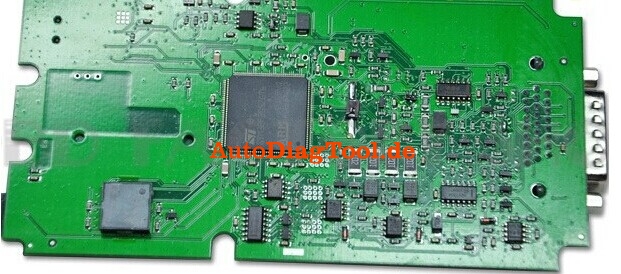
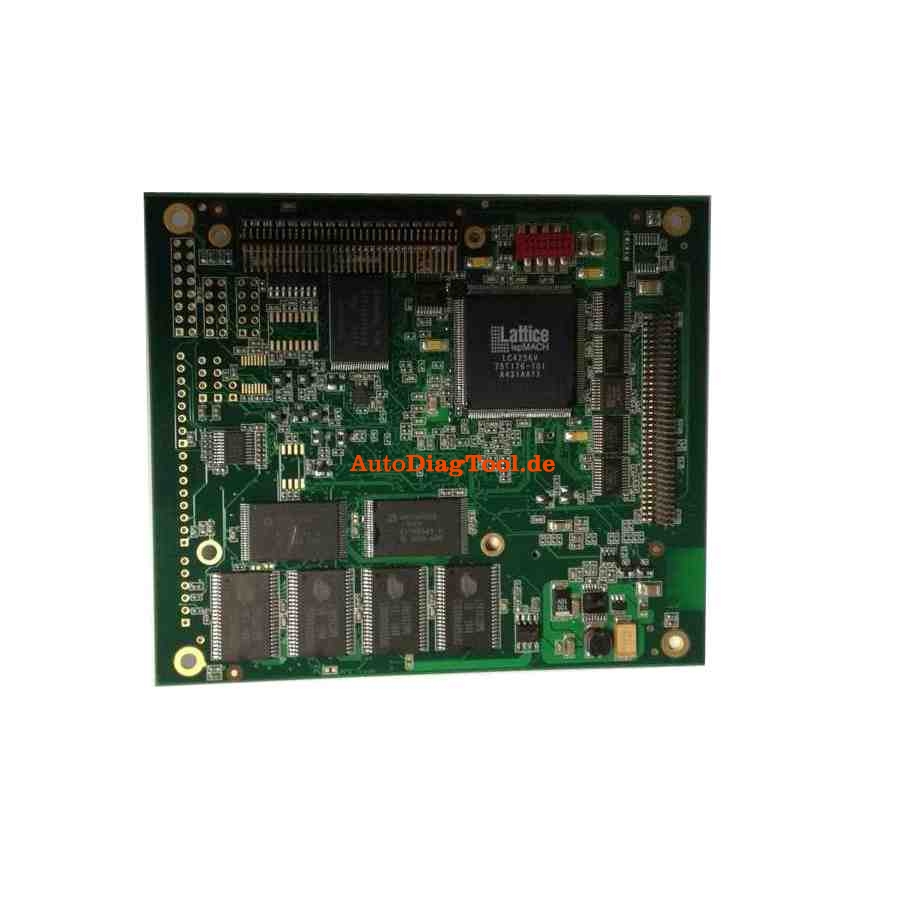
Best or not?? You can learn that from the PCB board.

But this version Multidiag Pro+ is without 4GB TF card. If you need this, you can choose Multidiag Pro+ Scanner with 4GB TF Card and Bluetooth.

We say “BEST” here is that the most appropriate for Multidiag Pro+ for MAN, IVECO Trucks.

MINI DSG Reader DQ200+DQ250 Installation Step

How to install MINI DSG Reader?

www.carobd.de provide the details step to install mini DSG reader for you.

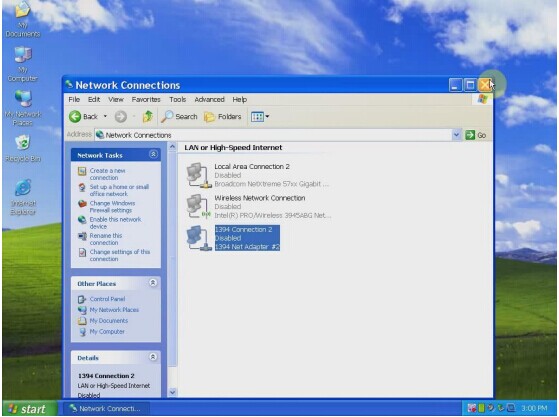
Step 1: Copy the software in the CD, paste them to your local disk. Step 2: Disable all Network Connection, including: the local area connection, wireless network connection and 1394 connection.

Step 2: Disable all Network Connection, including: the local area connection, wireless network connection and 1394 connection.

mini-dsg-reader-blog-1

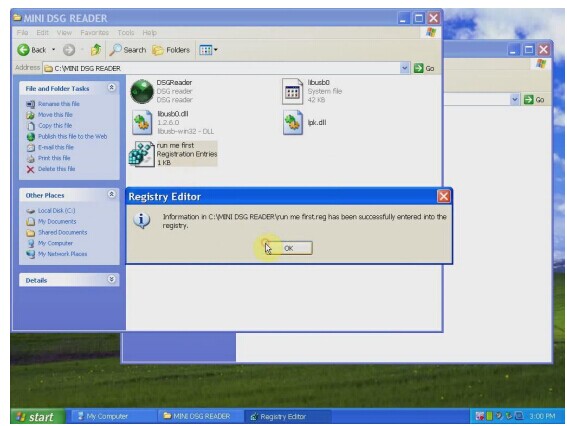
Step 3: Open the MINI DSG Reader folder, click “run me first registration entries”, and a windows dialogue popup reading: Registry Editor„, click OK.

mini-dsg-reader-blog-2

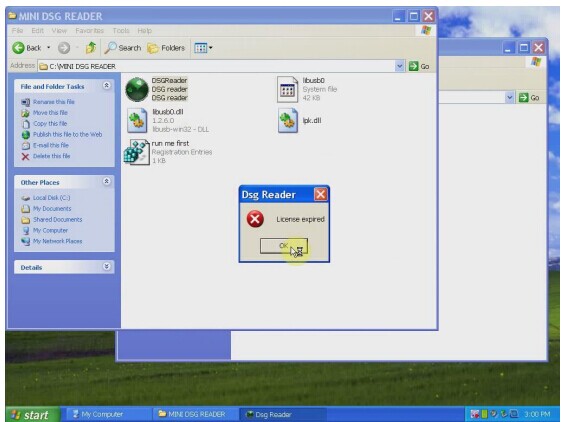
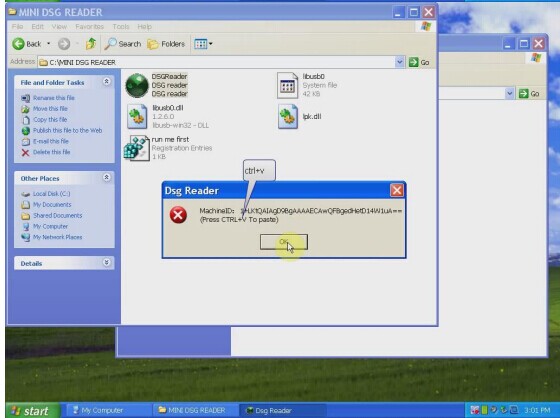
Step 4: Click icon “DSG Reader” and a windows dialogue popup displaying License expired, click OK, then another one popup showing machine ID, press “ctrl+v” to paste, and click OK.

mini-dsg-reader-blog-3

mini-dsg-reader-blog-4

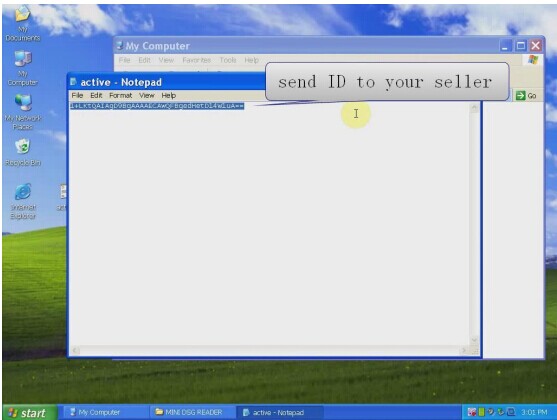
Step 5:Create one txt file in the desktop and into it paste the machine ID, then send it to your seller for activation.

mini-dsg-reader-blog-5

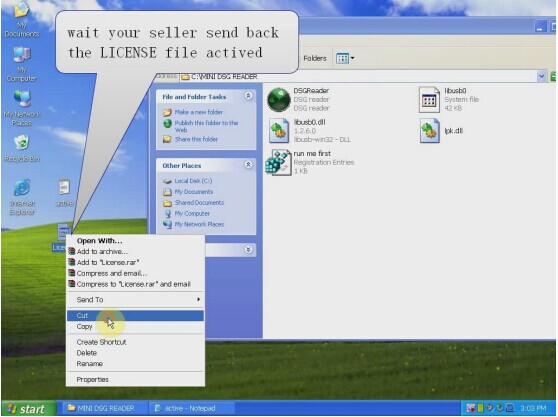
Step 6: your seller send back the license file activated, cut it and paste it in to the Mini DSG reader folder.

mini-dsg-reader-blog-6

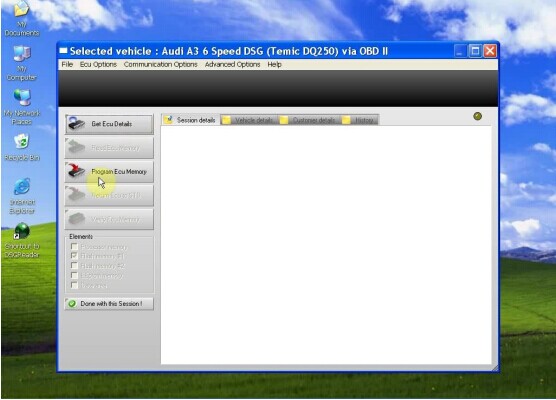
Step 7: right click the green icon “DSG Reader” to open it, then close the appeared screen, and again right click “DSG Reader”-send to-Desktop(create shortcut).

mini-dsg-reader-blog-7

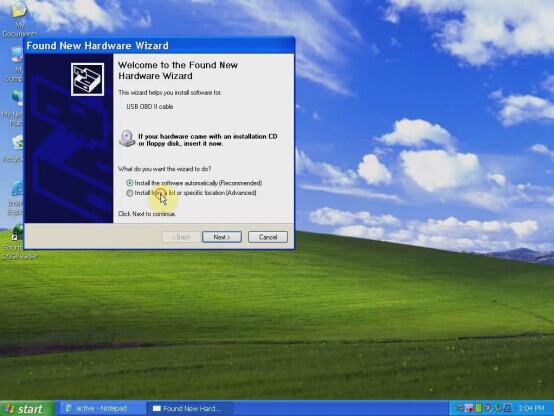
Step 8: connect the DSG reader to the computer and the car, then it will popup windows “ found new hardware”, step-to-step to install it.

mini-dsg-reader-blog-8

Step 9: click “my computer-device manager”, if you find “USB OBD II cable”, it means the computer and the DSG reader establish communication.

mini-dsg-reader-blog-9

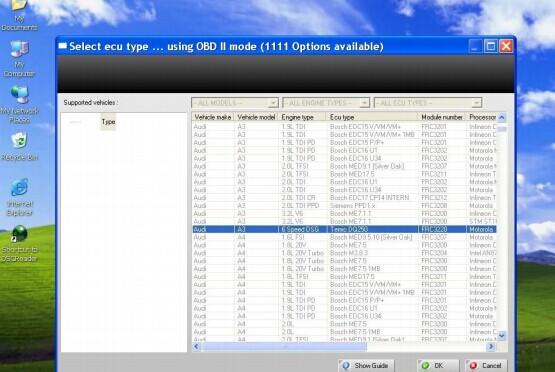
Step 10: Open the “Shotcut to DSGreader” in the desktop.

mini-dsg-reader-blog-10

mini-dsg-reader-blog-11

mini-dsg-reader-blog-12

Now, you are ready to start to use DSG reader to read and write latest dual-clutch DSG gearbox data for AUDI and VW~!

Autodiagtool.de Is On Spring Promotion

In order thanks for regular customer’s support,Carobd.de is on big sales,most of products are free ship by Post,

Any needs,please go and see.

For Example:

Lexia-3 V48 PPS 2000 V25 with Diagbox V7.57 Deutsche Version with Original 921815C Chips

best-lexia-3-pp2000-v601-diagbox-04

OPCOM OP-COM 2009 V CAN OBD2 OPEL Support Deutsch&English

opcom-op-com-2009-v-can-obd2-opel-sp12-01

Renault CAN Clip Latest Renault Diagnostic Tool V156 With Multi-language

renault-can-clip-b-quality-best-09

And So on,want to know more,please check this link.


MB SD C4 update to V2016.03

Dear All Customers:

Carobd.de MB SD C4 update to V2016.03,it is the newest software on market,and very stable and usefully!!

mb-sd-c4-star-diagnosis-1-blog

How to activate the MB SD C4? Please click here.

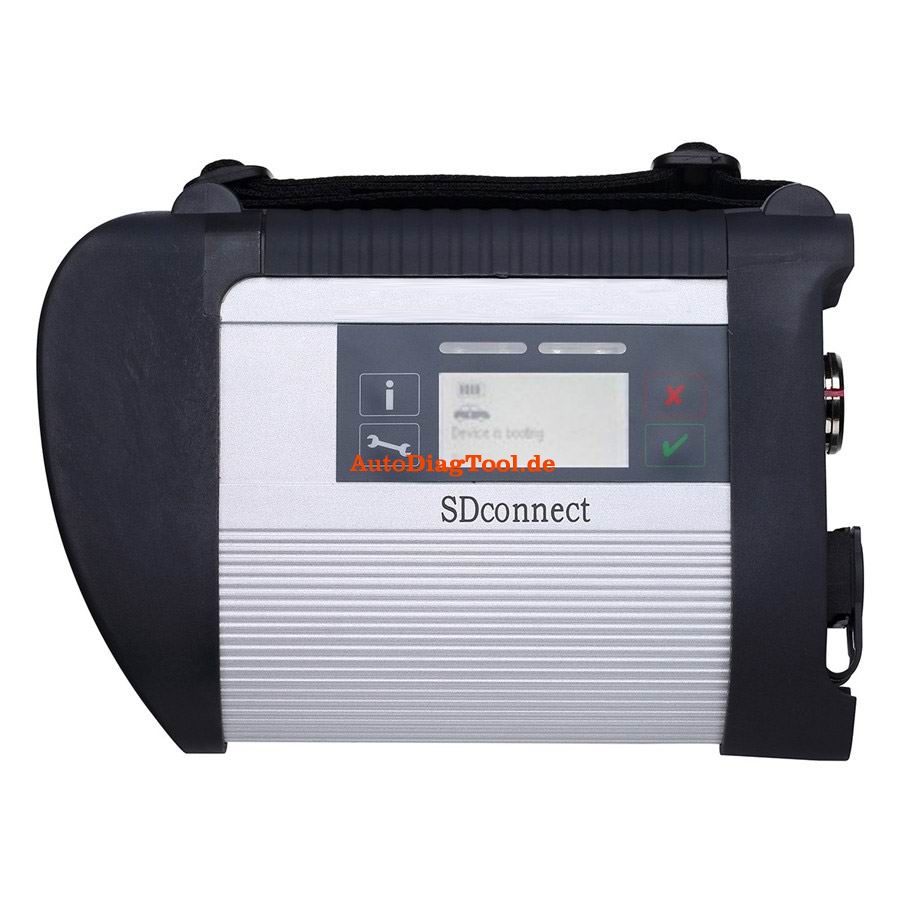
MB SD Connect Compact 4 support reading out & erasing trouble code,reading the real-time data of sensor and actuator, coding and programming. Also support wireless diagnose, support K line,CAN BUS and UDS protocol, with multi-language.


MB Star C4 SD Connect Diagnostic Tool Highlights:
1. Multi-languages: English/Bulgarian/Danish/Greek/Spanish/French/Italian/Korean/Polish/Romanuan/Serbo-Croatian/ Turkish/Czech/German/Finish/
Hyngarian/Japanese/Dutch/Portuguese/Russian/Swedish/Chinese
2. Newest Version:  2016.03      Hardware version: OS:2.3   CSD:2.8
3. Update via hard disk, you are offered to buy newest software HDD alone when newer software come out
4. Support both WiFi AND Lan cable connection. more easy to use!No need COM port computer.
5. Supports reading out & erasing trouble code, coding and programming for Mercedes Benz car and truck from 1996-2015.
6. Support both offline and online programming, but you need pay for the SCN Coding service
7. One year warranty, we also offer install service if you buy dell 630 computer from us.
8. There are two software model to choose: Dell D630 HDD, External HDD

Kindly Note

External HDD can not support WIFI function

After activating Xentry, if you can not save the code,pls try to use the following solution.

1. Change the time of your laptop to current time
2. Delete the file lic-key2.dat in Disk C【Patch C:\Documents and Settings\All Users\Application Data\LicDir】, and pass us the ID to activate again for you.
3. Make sure you pass us the correct HW-ID and APP ID
The Main Unit board display:
mb-sd-connect-compact-4-star-diagnosis-2-blog


How to Update KD900 Remote Maker

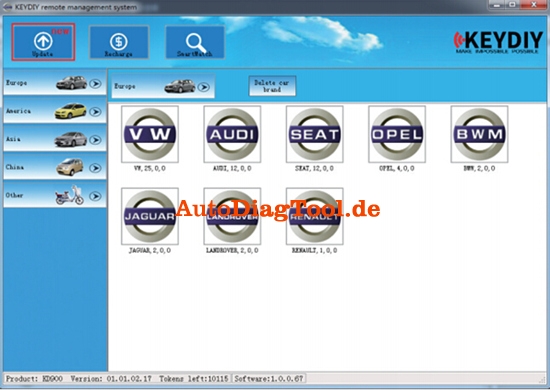
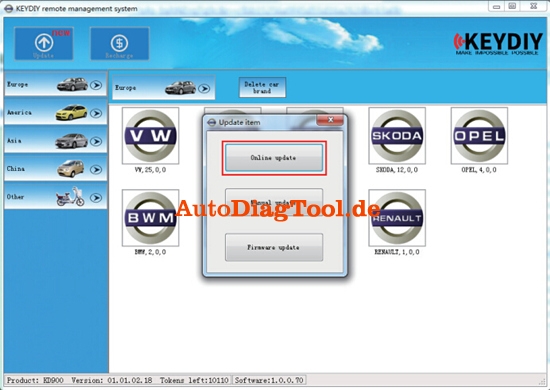
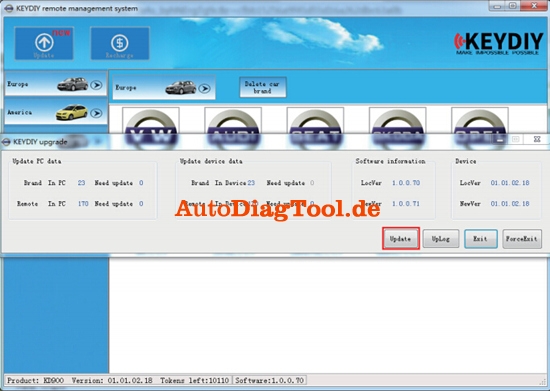
KD900 Remote maker supports 1 Button Smart Online Update, next we will show you how to update it.

Note: When updating, need to connect the net and download data, some anti-virus software may not allow our software to work. So when updating, please quit the anti-virus software to make sure the updating progress will work smoothly.

1.Click the Update Button

(Remark: Where there are new for updating, it will be showed on the top left with “new” in red.)

kd900-remote-maker-update-1
2. Click the Online Update Button

kd900-remote-maker-update-2
3. Click the Update

kd900-remote-maker-update-3
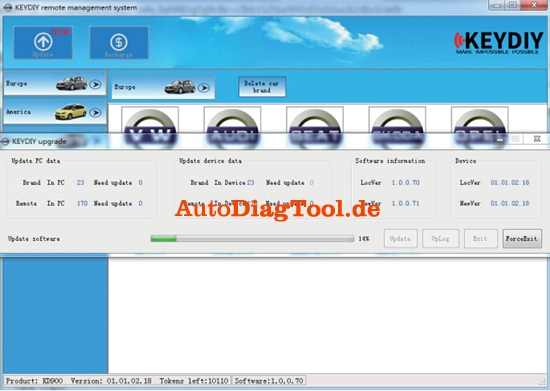
It will start to update and then wait few minutes.

kd900-remote-maker-update-4
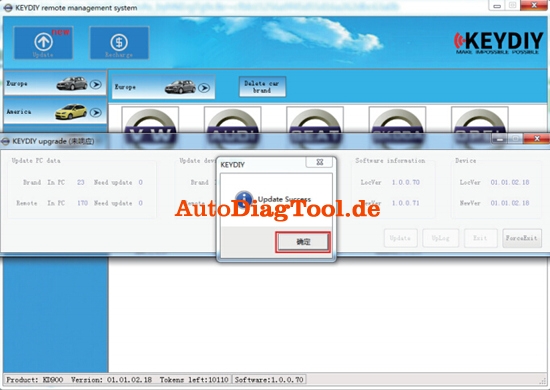
4. Click OK after updated

kd900-remote-maker-update-5

kd900-remote-maker-update-6
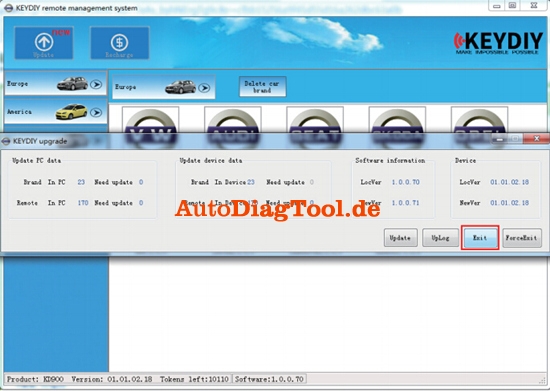
5. Then Exit

kd900-remote-maker-update-7
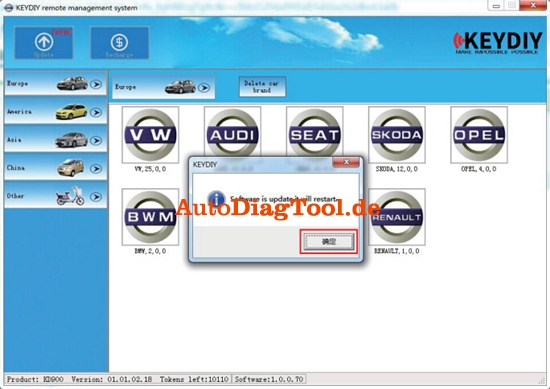
6. Press OK, then software will restart itself, updated finished.

(Remark: Sometimes, online update may not work, thus need to update manually.)

kd900-remote-maker-update-8

(Tested)Quickly 4C/4D/46/48 transponder key chip copy machine

The Quickly 4C/4D/46/48 transponder key programmer has been introduced for a period of time. Our engineers have successfully copied various types of key chips, following are our test results.

Ⅰ T5 chip (11-12-13-33)

Ⅱ PCF7935 chip series including: 40/41/42/44/45

40 Opel 40 Cherry 40 (cannot be interoperated)

41 Nissan

42 Jetta and HongQi

44 VW Vista 44 and Mitsubishi 44 (cannot be interoperated)

45 Old Peugeot

Quickly key chip reader can generate ALL above chips and save the read key code data unlimited if connected with Chinese PC software (Dell D630, Lenovo etc).

Ⅲ PCF7936 chip (46 chip)

PCF7936 chip, also called 46 chips are widely used in Honda, Nissan, Mitsubishi, GM etc many vehicle makes.

Quickly auto key programmer will decode and duplicate ID46 key. But you need to buy extra ID46 decoder.

Ⅳ 48 chip

48 chip is most used on VW Volkswagen group models

Ⅴ 8C

8C chip is used on domestic Haima car

Ⅵ 8E chip

8E chip is applied on part of Honda model

Ⅶ 4C Toyota

Toyota 4C chip including: 60/61/62/63/64/65/66/67/68/69/6A6B

72G is the 80-bit encryption chip applied on 2010-2012 Toyota models

8A is the chip used 2013 and up Toyota models

48 chip

48 chip is most used on VW Volkswagen group models

8C

8C chip is used on domestic Haima car

8E chip

8E chip is applied on part of Honda model

4C Toyota

Toyota 4C chip including: 60/61/62/63/64/65/66/67/68/69/6A6B

72G is the 80-bit encryption chip applied on 2010-2012 Toyota models

8A is the chip used 2013 and up Toyota models

For 4D and 46 copy functions, need buy special 4D decoder cloner box and 46 Decoder with dedicated chips. Here is the Quickly 4C/4D/46/48 key copy machine 4D Box connection diagram:

4c-4d-46-48-code-reader-chip-key-programmer-1