Archives

How to renew Benz EIS and replace Benz ESL with VVDI MB BGA Tool ?

In general, Benz electric steering locks (ESL) are used with EIS W204/ W207/ W212. ESL is damaged in high frequency. In this case, there are two possible reasons and solutions:

If the ESL motor is damaged, replace a new motor.
If the NEC chip of ESL is locked, renew EIS then replace ESL.
How to tell if the ESL motor is damaged or NEC chip is locked?

Open VVDI MB tool software. Click “Check ESL damage status”.

If it shows ESL works normally, generally it means the EIS motor is damaged and you need a new one.
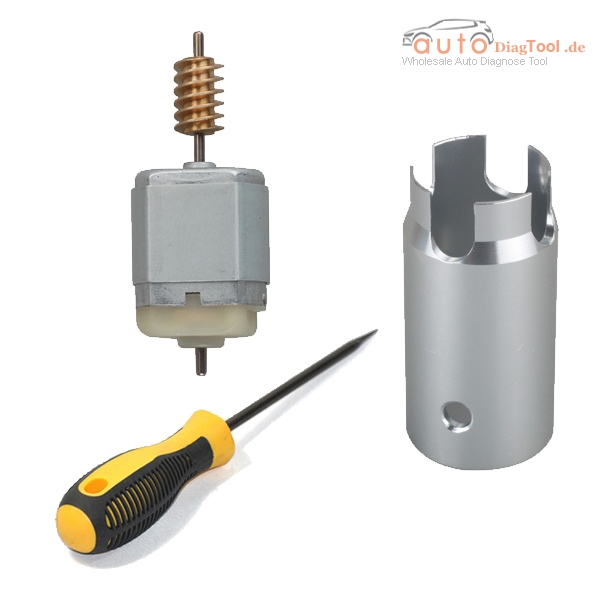
Replace a new motor, what need to buy?

—OEM MB ESL motor+ MB ESL dowel pin+ MB EIS removal tool

This full kit of MB ESL motor is available at:

esl-elv-and-oem-motor-steering-lock-plus-removal-tool-1
If it shows that ESL is damaged, then replace ESL.
This new ESL/ ELV emulator is recommended for your replacement:
How to replace ESL with VVDI MB Tool?

Step1.

To replace ESL, you need renew EIS at first, then re-write EIS and personalize ESL, in this way ESL is synchronized. To renew EIS, both key password and erase password are required.

Note: if you do not renew ESL first, but only personalize ESL, the ESL won’t be synchronized.

Get key password. You can increase key to get it.
Use VVDI MB NEC Key Adaptor to work with VVDI MB Tool to get key password.

Get erase password. In general, we can get the password directly with VVDI MB tool online calculation from server.
After input the two passwords choose “Infrared” as EIS communication way, then click “save EIS data”, Click “Renew EIS”.

Step2.

Now the EIS is full new, click “load EIS data”, click “Infrared” as communication way to enter new EIS data.
Click “OBD” as communication way to enter VIN.
VVDI-enter-new-EIS-data-3

Step3. Click “Personalize W204 ESL”

Step4.

After above steps, all EIS and ESL status checkboxes will be tick except the “Activated” checkbox. Insert the original car key hen EIS and ESL is activated. Now you use VVDI MB Tool to renew ESL successfully.

Note:

It’s hard to buy Mercedes W204/207 EIS and they are expensive.

If you have W204/ 207 all key lost, you can use W212 EIS for replacement.

VXDIAG JLR SDD V145 Offline Engineering Software Free Download

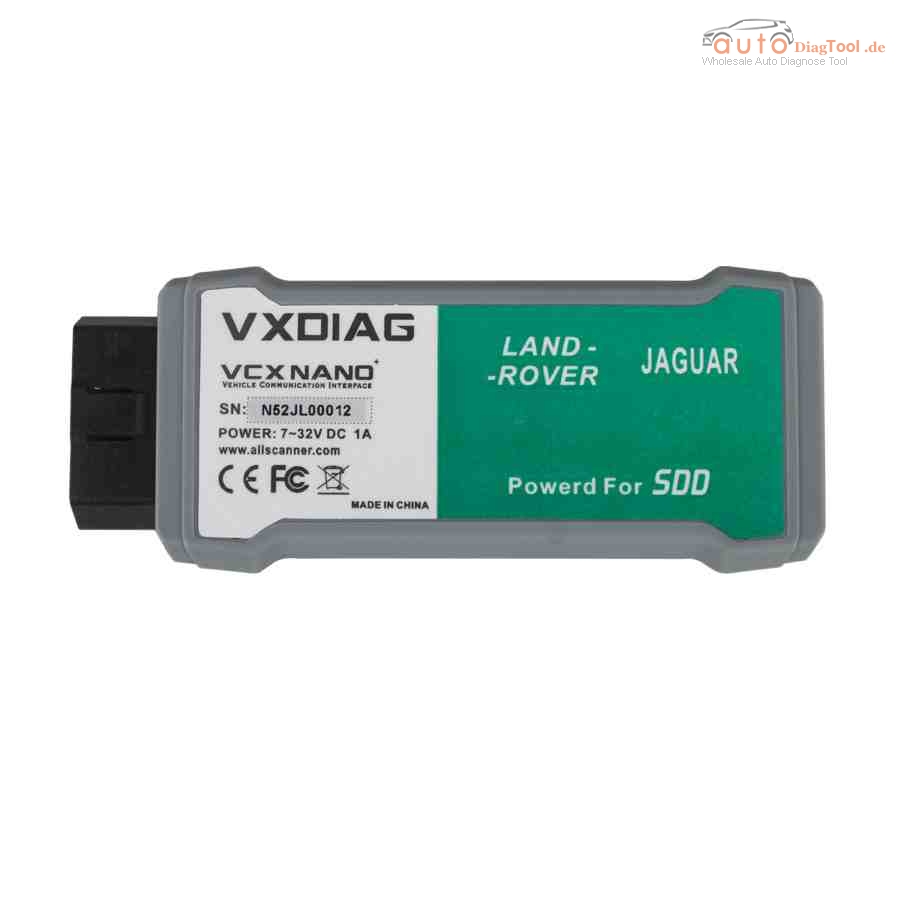
Jaguar and Land Rover 2 in 1 diagnose programming newest software has been updated to V145, which supports offline engineer programming. JLR SDD V145 can work with Vxdiag vcx nano for Jaguar and Land Rover diagnostic interface.

vxdiag-vcx-nano-for-landrover-blog-1

JLR SDD Multi-languages:

English, French,Finnish,German,Swedish,Dutch,Polish,Turkish,Portuguese,Spanish,Italian,Croatian,Danish,Slovenian,Czech,Russian,Greek, Romanian,Korean,Japanese.

JLR SDD Supported Car Models: Diesel and gasoline cars
JLR SDD Update: via CD, without firmware locked

JLR SDD Software Install Computer Requirements:

OS WIN7 32bit,
CPU I3 I5 and above,
RAM 1G and more,
HDD 200G and more
You’d better use the SSD disk

Free Download JLR SDD V145 Offline Version
https://mega.nz/#F!IVEjkJIJ!GVtIQMcqKFpqQHFkt_lLEA

Jaguar Land Rover SDD Interface Features:

1. Data Lists
2. Active Tests
3. Monitor
4. Utility tests
5. Reprogramming
6. Diagnostics Trouble Codes

Vxdiag JLR SDD Vcx Nano for Jaguar Land Rover Vehicles List:

Support 2005 to 2014 year vehicles of Jaguar and Land Rover
Support L316, L319, L320, L322, L359, L405,L494, L550, L538 Land Rover Vehicle Lines
Support X100, X150, X152, X202, X250, X350, X351, X400 Jaguar Vehicle Lines

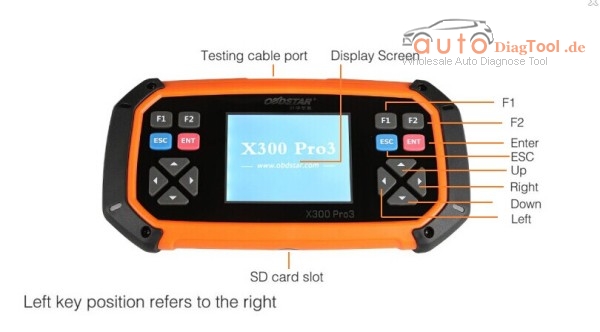
Original OBDSTAR X300 PRO3 Key Master Powerful Garage Tool

Hot selling X300 PRO3 Key Master full package is a original OBDSTAR newest key programmer cover more powerful functions than OBDSTAR F100 Ford/Mazda key pro, OBDSTAR X300M and OBDSTAR F108 PSA key pro does. In fact, OBDSTAR F100 Ford/Mazda key pro and OBDSTAR X300M are divided programmer out from X300 PRO3 Key Master. If you are a master working at workshop/ garage, you are advised to own one OBDSTAR X300 PRO3 Key Master.

obdstar-x300-pro3-blog-1

OBDSTAR X300 PRO3 hardware features:

Modern design with high definition screen.
Crack proof, shock proof and it can work stably under tough environment, such as at high or low temperature.
OBDSTAR X-300 PRO 3 software features:

The main system adopts ARM high speed chip to keep it stable and anti-jamming while running fast.

X300 PRO3 full package supports most vehicle models, and including functions:

New keys programming ( except VW 4th IMMO and VW 5th IMMO.)
Reads keys from immobilizer’s memory
New immobilizer programming
New ECU programming
New mechanical key number programming
Vehicle Identification number programming
ECU reset & immobilizer reset
Easy to operate by the programming guide menu
New remote programming
PIN code reading
Odometer adjustment (Via OBD)
EEPROM/PIC chip reading and immobilizer initialization
(read write CPU data on a part of car computer, read out password from EEPROM chip and restore data)
EPB
Oil service reset
Battery matching etc
Full and strong database for the most famous vehicles makes

Volvo Vida Dice 2014D Install Error tskill.exe not recognized Fixed

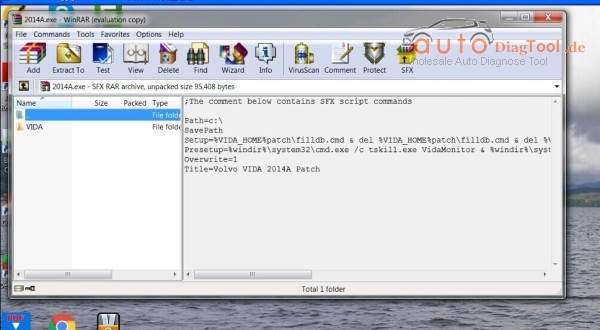
As customers feedback, during installed Super Volvo Vida Dice Pro+ 2014D patch, it pops out error message “tskill.exe is not recognized as an internal or external command or operable program or batch file”.  When click “Vida all” icon the interface will turn to a blank page.  Soon there is another new prompt “The comment below contains SFX script commands” vida error.


vida-error-1-blog-1

Reasons and Solution: Before install Vida 2014d patch you can check whether you finish all pre-install steps or not.

Vida 2014 patch software must be installed at [C disk], so you can do two things:

1. Check if this software is match to your laptop OS;

2. Check if the software is installed at [C disk].

Your computer might be not compatible with this software. So if you could not install it successfully, we suggest you to download our Win 7 to install: http://www.chinaautodiag.com/html/win7-32bit-free-download-19514.html
Vida DICE 2014D OS: Windows 7 32Bit

Vida dice install computer configuration requirements:

1). Internet Explorer 8

2). Over 2GRAM

3). C:// must have 40GB space

4). Software must install on C://

5). Must be NTFS format

How to set up XTOOL PS201?

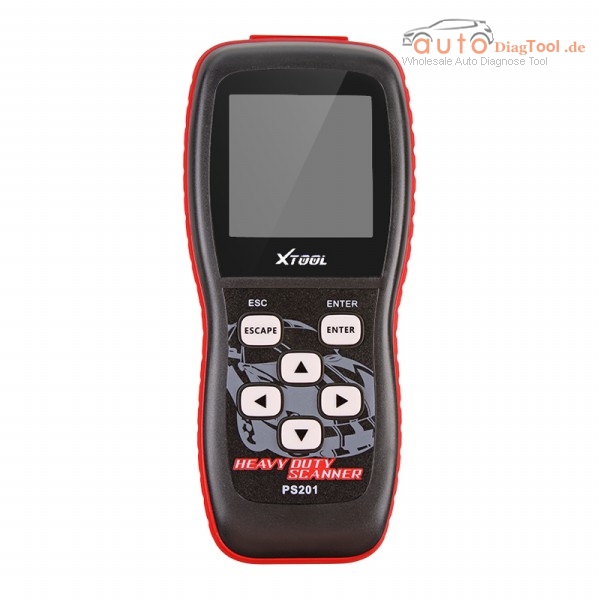
The PS201 heavy duty CAN OBDII code reader has been designed and built to Construction, Marine and Agriculture applications vehicles, specifically for diagnose Truck, Bus and Coach OBDII/ EOBD/ CANBUS compliant vehicles from 1996 onwards. It may be small in size but it is powerful enough to perform the same tasks as premium level workshop scanners while being faster and more user friendly.

xtool-ps201-code-reader-1

1. Connect the scanner to your vehicle: PS201 communicates with the computer in your vehicle through a special connection. One end of the cable plug into the connector on the top of PS201 and the other end to the adaptor, which plug into the diagnostic socket on your vehicle.

1.Each vehicle manufacturer has its own specific diagnostic socket location.

2. Make sure that all pins are straight and the connecting surfaces are free from oils, grease and moisture.

3. Push the PS201 diagnostic adaptor into the vehicle diagnostic socket firmly.

4. Connect the PS201 cable to the socket on the top of the tool.

2. Set up: Turn the vehicle ignition key to ON or start the engine, then the PS201 will automatically start.

set-up-blog-1

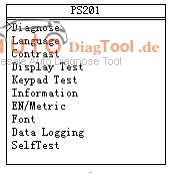
[Diagnose]: State diagnosis

[Language]: Select language

[Contrast]: Contrast level modification

[Display Test]: LCD display test

[Keypad Test]: Key test

[Information]: Show firmware information

[EN/Metric]: Select English or Metric units

[Font]: Adjust font size

[Data Logging]: Switch on/off the Data Logging function

[Self Test]: Use the Self Test Connector to test this tool is OK or not

3. Operation: Use

[Up]/[Down] button and [ENTER] button to select setting tool or diagnosing vehicles.

4. After use: Use [ESC] button to back the main menu, and disconnect from the vehicle.

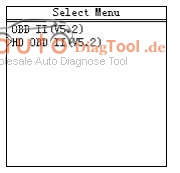
Select Menu: Select [Diagnose] and press [ENTER] button, PS201 includes two categories of software:

xtool-ps201-code-reader-blog-1

1. OBD II: ISO 14230, ISO15765, SAE J1850

2. HD OBD II: SAE J1939 CAN, SAE J1708/J587

Keep Notice:

a.Make sure the vehicle is connected. Make sure the connectors are firmly connected.

b.Keep the vehicle ignition key ON or the engine running.

Vpecker Easydiag Scanner Bluetooth vs. WiFi

Wi-Fi version VS Bluetooth version

Bluetooth and WiFi are different standards for wireless communication.

Bluetooth technology is useful when transferring information between two or more devices that are near each other when
speed is not an issue,such as telephones,printers,modems and headsets.It is best suited to low-bandwidth applications
like transferring sound data with telephones(i.e. with a Bluetooth headset)or byte data with hand-held computers(transferring files)
or keyboard and mice.

WiFi is better suited for operating full-scale networks because it enables a faster connection,better range from the base station,
and better wireless security(if configured properly)than Bluetooth.

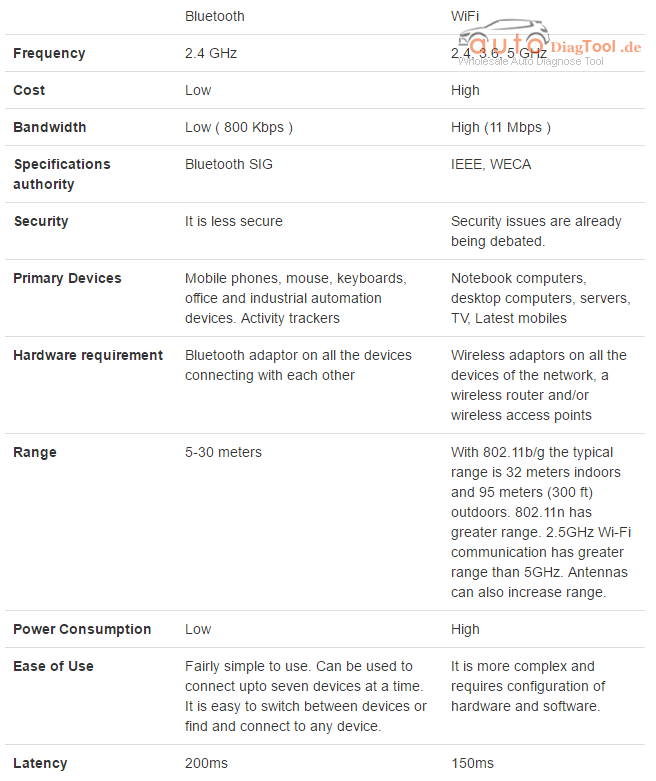
Vpecker Easydiag V8.1,which version better for diagnosis? Please refer the chart below for more specification to make a decision.

vpecker-easydiag-scanner-bluetooth-blog-1

autodiagtool.de has kinds of Autel Maxidiag

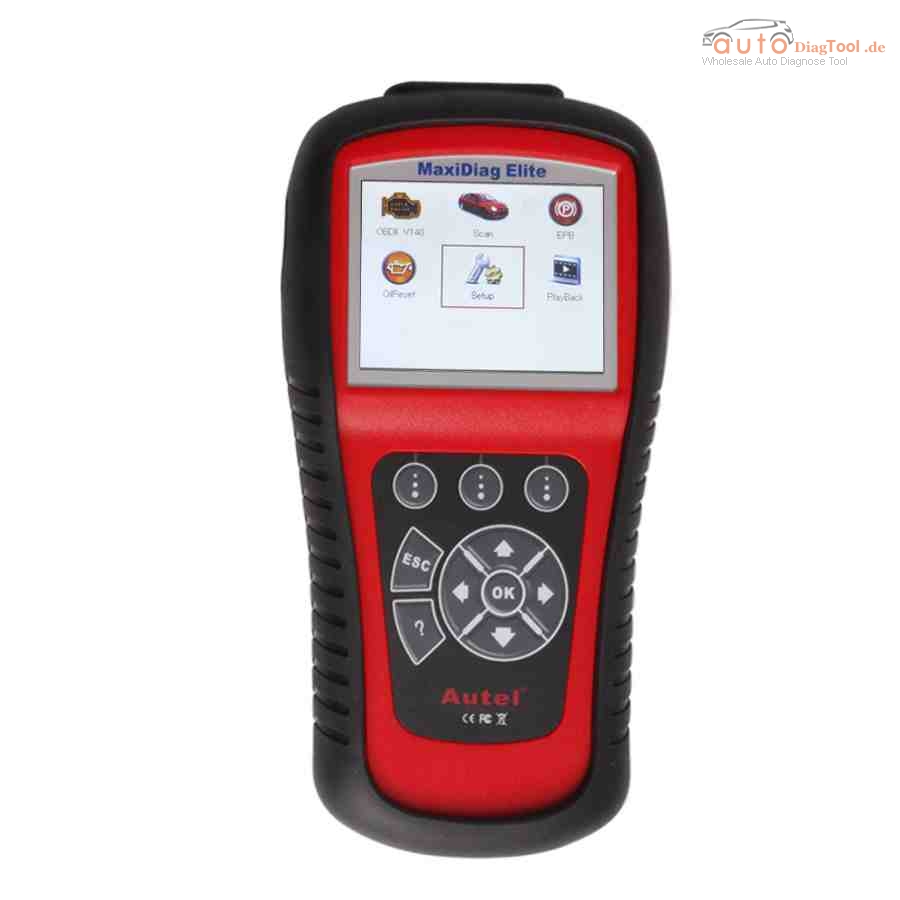
Original Autel MaxiDiag Elite MD802 All system+DS Model:

3 Reasons to Get Maxidiag Elite MD802

1.MD802 Language: English
2.Update: Via EMAIL, after one year you will pay 75.00EUR
3.Vehicle Coverage:MD701, MD702, MD703, MD704
What is DS model?

Autel Maxidiag Elite MD802 for all System+data stream function.

Autel’ new MaxiDiag Elite Series, the most advanced and multifunctional scan tools powered by its exclusive technology, are designed for technicians to troubleshoot either the basic four systems or all the systems for most of major vehicles on the road today. This new diagnostic platform delivers fast and easy diagnostics at the right price.

autel-maxidiag-md802-abs-airbag-code-scanner-blog-1

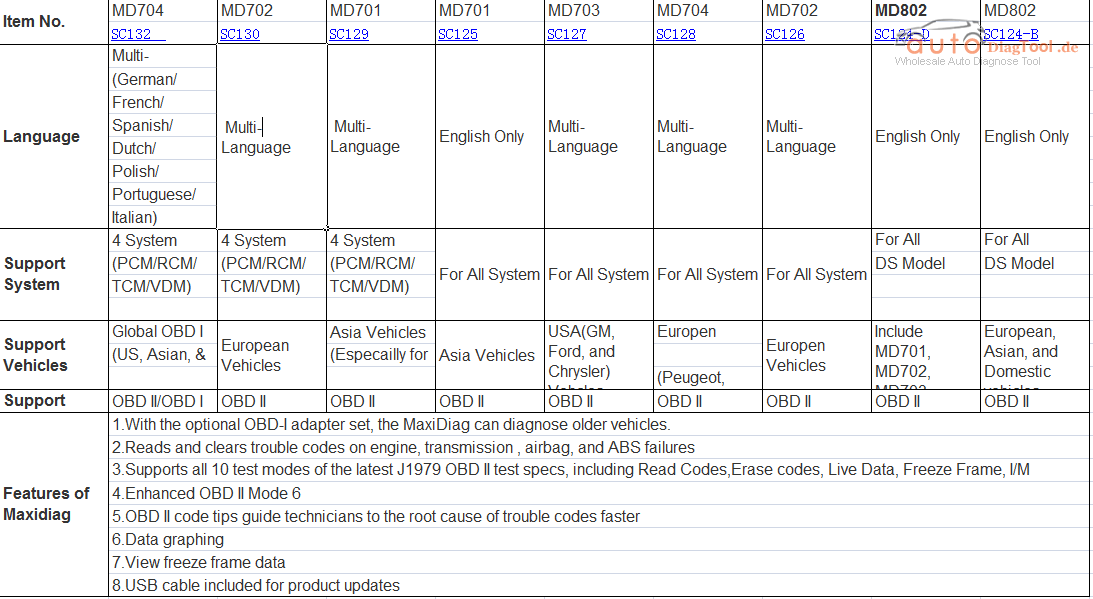
Autel Maxidiag Comparison Table: 

table-blog-1

Which ecu programmer is better

Some users asked what’s the best eeprom programmer in the market.In the following parts,Carobd.de senior engineer

list some best-selling and good quality eeprom programmers.

Notes:the following products listed by sales volume.
Carprog Full V9.31

Carprog Full V9.31 is 2 years younger than X-pro m,started sold from 2012 year at

carobd.de,However its sales volume is higher than XPROG programmer because of its additional function-support airbag
reset,and it only sales about 53 EUR,not mean Xprog end of this time,if you simply want to read &write chip,
X-pro M is the best choice.

carprog-full-ecu-chiptuning-tool-blog-1

Xprog-m ECU Programmer

As the oldest eeprom programmer in the market,x-pro m gave birth in 2010,during the past 4 years,it keeps updating software
and good quality at cheap price,therefore x-pro m win lasting good reputation among many users around the world.it has been
proven by many VIP members and veterans from the famous forum.

x-prog-box-ecu-programmer-xprog-m-blog-2
X-pro m ECU Programmer brief introduction:

Xprog works with more than 450 units(serial EEPROM’s,Microcontrollers(MCU),Electronics Control Units,DashBoards,Immobilizers,
Calculators and others.

Now,Xprog newest version is V5.50,more details about Xprog autorizations,adapters,notice and OS requirement;you can directly
search at carobd.de site.