Archives

Review on selecting Techstream Customize Functions: Gen III

I purchased Techstream and a min vci cable from a Chinese seller for $19 to do some customize settings on a 2010 Prius.

I used:

Laptop with Windows XP 32 bit

Xhorse mini vci cable with Teachstream 8.10.021 from carobd.de

Note:

1- new software- toyota-techstream-10.30.029.zip or toyota-techstream-10.10.018.zip – should be ok

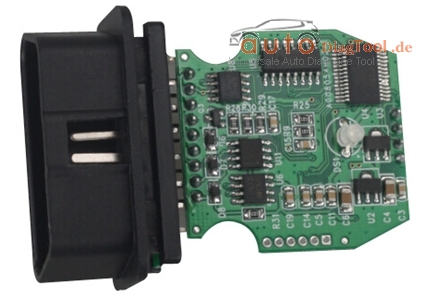
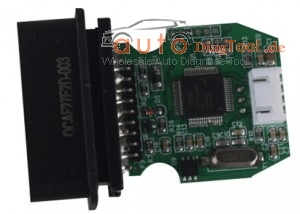
2- many Techstream cables in China, but some bad with white PCB

TIS cable of Quality A comes with green PCB

mini-vci-pcb-board-blog-1

mini-vci-pcb-board-24

Model:

2010 Prius
First attention please!!

The USB to OBD2 VCI cable driver will only run on a 32 bit computer. Even with an old 32 bit Win XP computer, I had to load/reload the cable driver 3 times. Once done, it is great.

Your owner’s manual covers the customizable features built into the car.

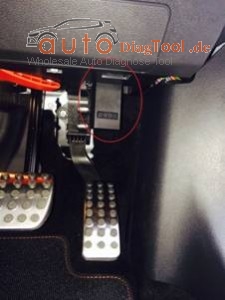
To get to the customizable features, connect the laptop to the car OBD2 port just under the steering column. Start MINI VCI Techstream and depress the brake pedal and press the cars power button. Techstream should connect and ask you the options on the car (radar cruise control and sunroof). It will also pop up with the VIN number and ask if you want to save it.

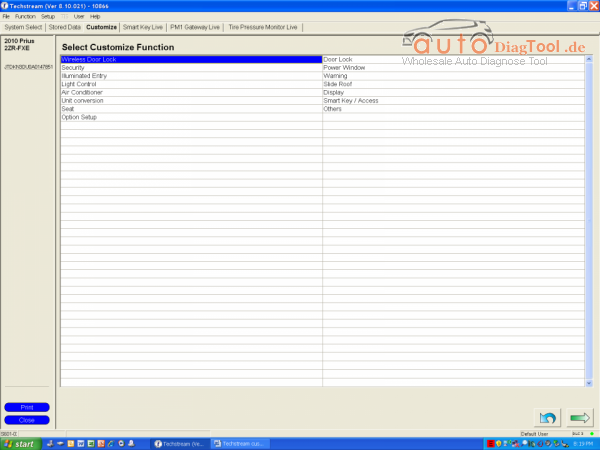
After that it’s easy. Just select the third tab from the left, Customize

Techstream-Customize-blog-2

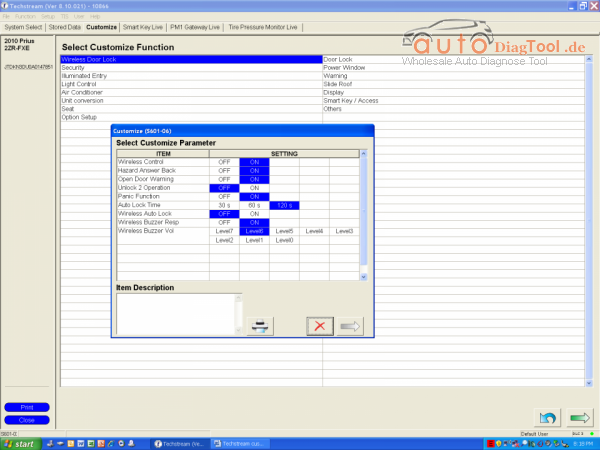
Next select one of the Customize Functions and a small box will pop up with parameters

Techstream-Customize-blog-3
If you click on the parameter, an explanation will show in the Item Description box below. After you are done selecting parameters, click on the arrow in the bottom left of the small box and it will ask you if you want to save. Select “Yes” and move onto the next Function. You will be amazed at the options you have. You can even turn off the seat belt beeper on the driver or the passenger side or both.

I turned on 4-door unlocking and turned the backup beeper to only 1 beep. You can turn on/off the remote button functions. Actually, my dealer inadvertently turned off ALL of my remote functions and was not able to turn them back on. This was my main reason for digging into MINI VCI Techstream TIS interface. I was also able to program a new remote Key Fob using the Smart Key Menu on the fourth tab.

Hope you all have fun with this!

My experience with elm327 WIFI

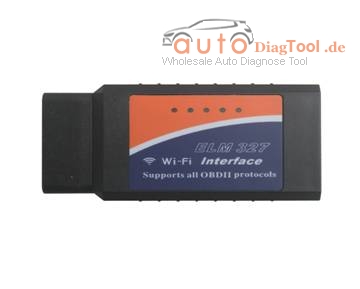
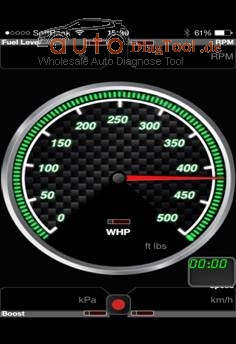
Once I played with an OBD2 connector, ELM327, which can see various datas from the computer of the car via smart phones, iphone, ipad and ipod.

It seems like can also reset and display of the error codes, but I do not know well yet.

There are two ways of connection, via WiFi connection and Bluetooth connection the iPhone. (Like Bluetooth version, Android is somewhat cumbersome.) I have ordered the WiFi myself, so iPhone users. (US$12.99 now)

image001-blog-1

Insert face down the label of the ELM327 device to the vehicle as picture

image002-blog-2
Now, it is confirmed by WiFi setting screen of the iPhone then. It is named CLKDevices here. this device name is different from people to people. However, as the IP address and subnet mask is the same as everyone.

192.18.0.11

255.255.255.0

192.168.0.10

192.168.0.10

image003-blog-3

I was able to WiFi settings in the app without any problems. It was OK just to select the Kiwi WiFi in HardWare of Settings. It was a mile display by default, changes to the display Km was also possible.

Fuel level indicator in the CLA does not seem to work properly from it. In the state of just rammed the iPhone accessory case on the center console, only chiller while driving

image004-blog-4

Therefore, above is about my experience with 1.5V elm327 WIFI, and it is also a Bluetooth version and other similar items, for iphones, ipad, smart phones and so on.

Digiprog 3 v4.94 update software“List index out of bounds”

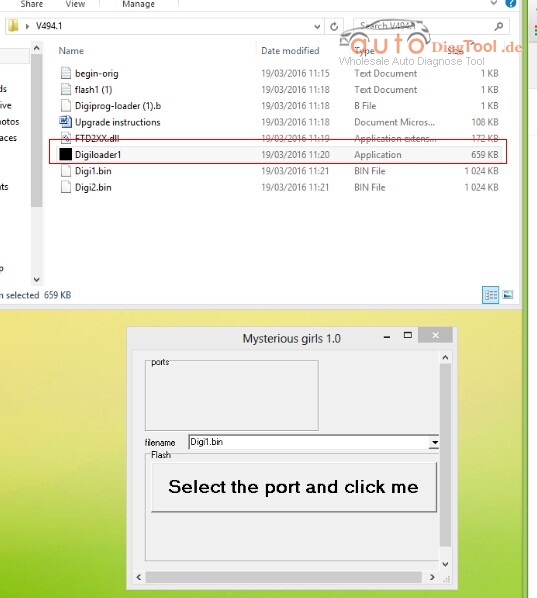
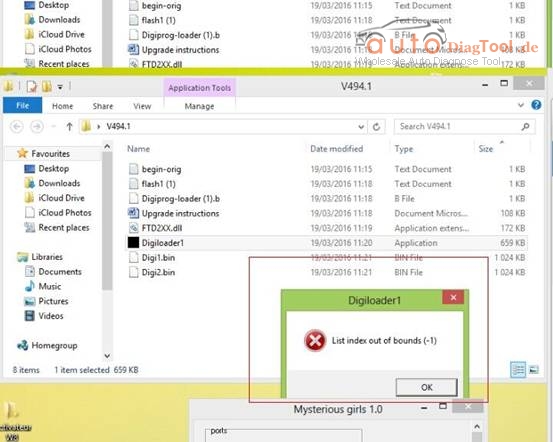
This is about how to solve Digiprog 3 v4.94 Odometer Master update software“List index out of bounds”.

image001-blog-1

image002-blog-2

Device used:

Digiprog 3 programmer

Digiprog3 v4.94 update software error message:

Digiloader1.exe: Disk index out of bounds

Possible reasons:

1- WinXP is not compatible with the digiprog3 4.94 update software

2- Digiloader1 file was killed by virus

3- The update file is not complete

Useful tips:

1- Try to use Windows XP operating system belows:

http://www.chinaautodiag.com/html/ghost-windows-xp-professional-sp3-free-download-and-installation-6476.html

image003-blog-3

2- Not ports showing so check in device manager.

3- Rename
Digiprog-loader(1).b
To
Digiprog-loader.b

How to brush the GM MDI?

GM MDI Multiple Diagnostic Interface is with Opel Global tis global diagnostic system and GDS2 diagnostic system. GM MDI is an interface between the vehicle DLC and a PC (by wired USB, wired Ethernet, wireless Ethernet ) and TIS2web,it is support Multi-language,the function is strong ,can support online programming and coding.

Last Week

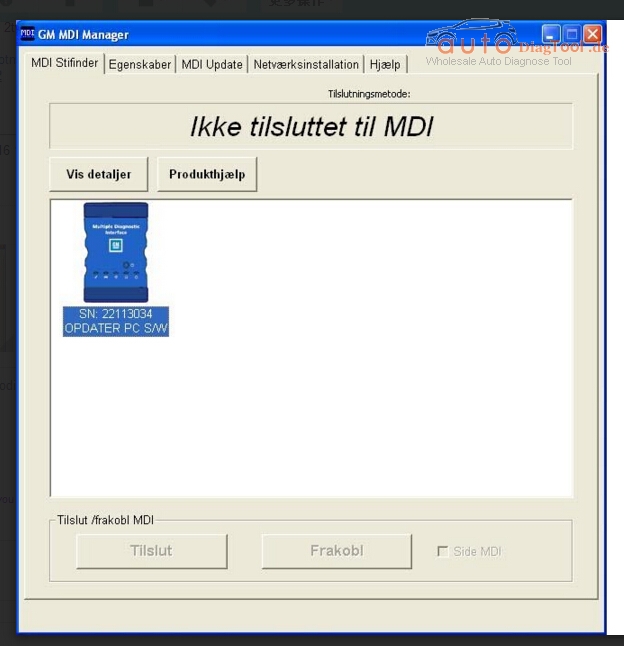
One of my customer told me that his GM MDI Manager software can not connect with MDI, however it can find MDI unit.like below picture.

problem-1

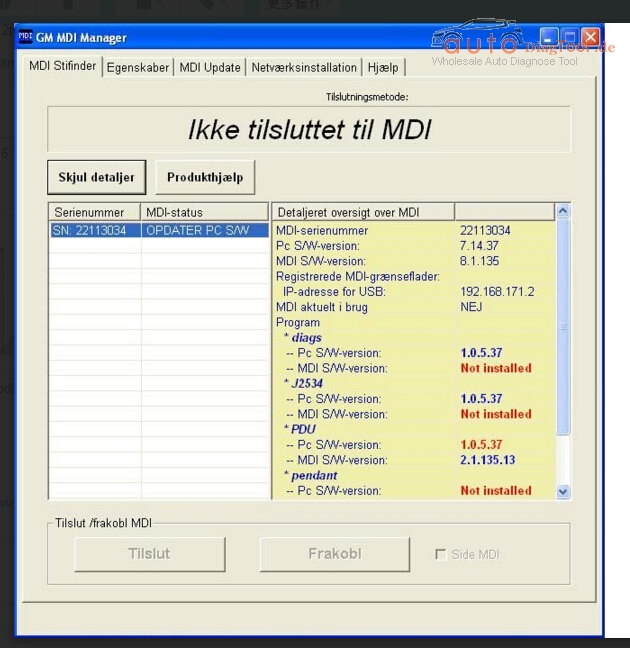
And prompt”It says that I need to update the software on my PC.”

problem-2

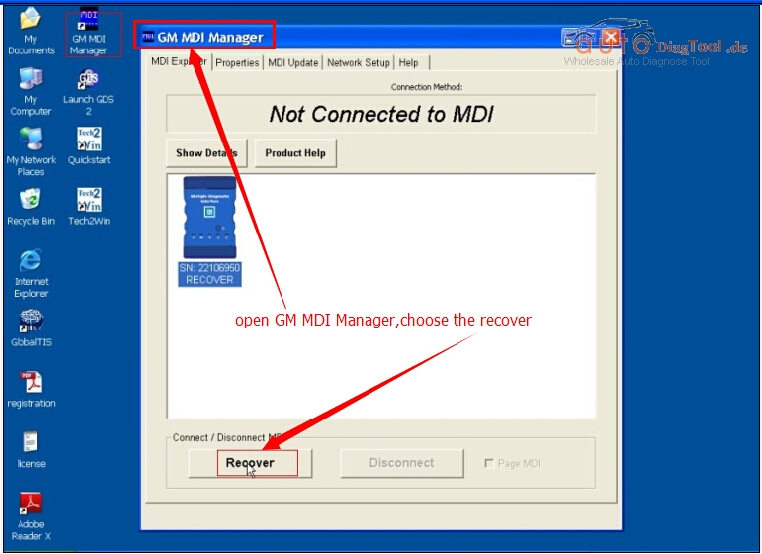
So,for this,we need to brush the main unit,you can follow the step to operate.

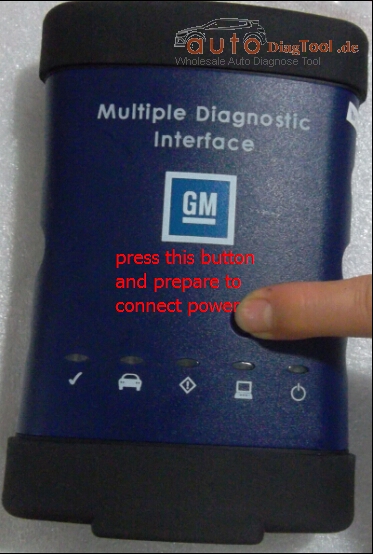
Step 1press this button and prepare to connect power

step-1

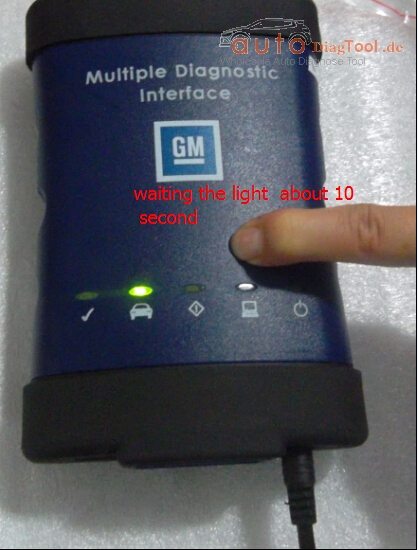
Step 2waiting the light about 10 second

step-2

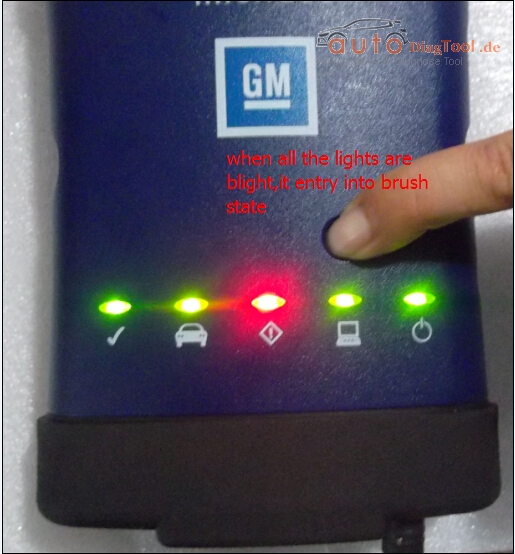
Step 3when all the lights are blight,it entry into brush state

step-3

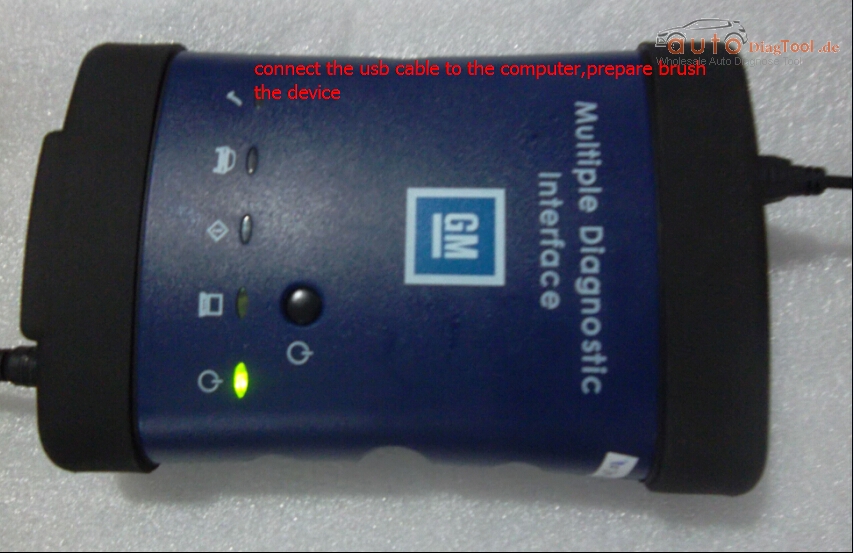
Step 4connect the usb cable to the computer,prepare brush the device

step-4

Step 5open GM MDI manager,choose the recover

step-5


At last,my customer deal with the problem successful!

Xtool EZ400 vs PS2 GDS vs Autel MS906 vs DS708

Xtool EZ400 vs PS2 GDS vs Autel MS906 vs DS708

www.carobd.de provide the high quality of XTOOL EZ400 diagnostic tablet,and Autel MS906 comes also here to replace DS708.

Here is the comparison tablet of Xtool EZ400, PS2 GDS, Autel MS906, DS708.

Product XTOOL EZ400 XTOOL PS2 GDS Autel MaxiSYS MS906 Autel MaxiDas DS708
Appearance  XTOOL EZ400  XTOOL PS2 GDS  Autel MaxiSYS MS906  Autel MaxiDas DS708
Screen 7 Inch 8 Inch 9.7 Inch 7 Inch
Language EZ400 language info will be released later. English & Russian Only English now, but France/ German/ Spanish/ Japanese/ Portuguese/ Russian version will be released in future. Multilanguage: English/ France/ German/ Spanish/ Japanese/ Portuguese/ Russian
Update One-click update via WIFIfor 3 years Online upfate for 3 years Free update online for 1 year Free update online for 1 year
Memory Memory: 1GB RAM,16GB FlashSupport 32GB extension SD card Random Memory: SDRAM 64MB
Programming Memory: Supports SD card slot-in and slot-out
2GB RAM & 32GB Solid State Drive (make MS906 run fastest) Max. 4 Gb SD card
WIFI YES NO YES YES
Bluetooth YES, 100 Meters YES NO NO
Operating system Android 4.4.4 WINCE 5.0 Android TM 4.0 OS Windows CE
Vehicle coverage Most US, Asian and European OBDII vehicle makes since 1996 most US, Asian and European CARs more than 80 US, Asian and European vehicle makes more than 40 US domestic, Asian and European Petrol and Diesel 12V cars models
Programming NO NO NO. (autel MS908P support online programming & ECU coding) NO
Special function ABS bleeding, service light reset, DPF regeneration, steering angle calibration, battery reset, throttle body adaptation, Service light reset, Throttle Sensor Adjustment Key programming, reset oil service light, oil inspection, service mileage, service intervals and airbag NO NO
Capabilities Codes, live data, actuation tests, adaptations for FULL systems(Diagnosis reports in PDF file) Codes, live data, actuation tests, adaptations Codes, live data, actuation tests, adaptations Codes, live data, actuation tests, adaptations for full systems
Built-in On-board battery Built-in printer Built-in 5-megapixel rear camera & lithium-ion battery Built-in overvoltage protection
Warranty 3 years 3 years 1 year 1 Year
  Xtool EZ400, PS2 & Autel MS906, DS708 in different shapes are all excellent diagnostic tablets with all basic functions and a wide range of vehicle coverage 

1. Autel MS906 replace DS708, with a faster running speed

2. Xtool EZ400 replace PS90, the same function as ps90 but can not read EEPROM

How to Update Old Models?-NT600 NT300 NT200 NT405

How to Update Old Models?-NT600 NT300 NT200 NT405

How to Update Old Models?

e.g. NT600/NT300/NT200/NT405 which may not be found at our website any longer?

To update NT100, NT300, NT405 and NT600, please follow steps below:

1. Visit our website www.foxwelltech.com and then select Support>Update . Or just click the link here : http://www.foxwelltech.com/support/update/

2. Click the image of your tool to download update package which includes update tool Foxlink, and update files.

3. Follow the on- screen instructions to install the update tool Foxlink and double click the desktop icon to launch the application.

4. Connect the tools with the computer with the USB cable and Foxlink identifies the device automatically.

5. Click <Select file> to locate the update files you downloaded.

6. Click <Update> to start updating.

How do you think Porsche 911 GT3 engine problem issues?

Porsche 911 GT3 This morning, I was shocked by a piece of breaking news entitled “Porsche warns 911 GT3 owners of fault”, the general content is “DETROIT — Porsche is asking owners of its 911 GT3 models to stop driving them because they can develop engine problems and catch fire. The problem affects 785 GT3 cars from the 2014 model year, including 408 in the U.S. Porsche says engines were damaged on two cars in Europe, and both caught fire. The company says there were no crashes or injuries.”

testerii-diagnostic-scanner-for-porsche-piwis-main-unit-3
Wish the Porsche 911 GT3 engine problem issue have a fast resolution. It happens that I also have a Porsche 911 and I also had the engine problem several months ago, but as the time suggest, my engine problem is not quality problem.

Time back to one morning of several months ago, when I entered into my car, and turn on the ignition, the check engine light on and keep flashing. I have no idea and called my friend, he suggest me if it is the Engine problem, he prompted me check whether I forgot to close the gas cap, or a component has malfunction. The gas cap is closed, as for which component has malfunction, I have no idea and have to drive it to the garage, and the garage repairman said, there is some trouble codes stored in the engine ECU, he picked out one Porsche diagnostic tool named Porsche PIWIS Tester 2 (it looks like the following picture), and a Panasonic laptop, then he use cable to connect the tester with the laptop and the car, in order to check and display the problem on the laptop. Then he install the software, during the installation he called the dealer for authorization, after the installation finished, he use the PIWIS tester to test, he showed me the trouble code , it is P0197, he said it means “Engine Oil Temperature Sensor Low”, after knowing where the problem is, he fastly and definitely solve the problem with PIWIS tester. The engineer is talkative and he said my problem is just a little case to PIWIS tester, PIWIS tester not only has diagnostic function, but supports offline programming as well as online programming, it not only work with car, but also sports car.

This is my personal experience about Porsche PIWIS Tester II, wish it can help you if you also have the same problem.

Foxwell GT80 PLUS Diagnostic Platform Coverage More Wild Cars

Foxwell GT80 PLUS Next Generation Diagnostic Platform

Foxwell GT80 Plus can do the latest 2015/2016 models,with comprehensive functions.it support win 8.1 Operate System,10 inch LED touch screen,kindly interface,very convenient to use.

Foxwell GT80 Plus Vehicle Coverage:
USA Coverage
Chrysler,Ford,GM,Brazilian GM(For Brazilian Market Only)
ASIA Pacific coverage
Au Ford (For Australian Market Only), Acura, Brilliance, BYD, Chery, Daewoo, Geely, Great Wall, Honda, Holden (For Australian Market Only), Hyundai, Infiniti,
Isuzu, JAC, Kia, Lexus, Mazda, Mitsubishi, Nissan, Perodua, Proton, Scion, Subaru, Suzuki, Toyota
European Coverage
Audi, Bentley, BMW, Bugatti, EU Ford, Jaguar, Land Rover, Maybach, Mercedes Benz, Mini, Opel, Porsche, Rolls-Royce, Saab, Seat, Skoda, Smart, Sprinter, Vauxhall, Volvo, VW
French & Italian Coverage
Abarth, Alfa-Romeo, Citroen, Dacia, Fiat, Lancia, Maserati, Peugeot, Renault

GT80 PLUS Identifies Vehicle By VIN

GT80 PLUS lets you identify the vehicle you are testing rapidly and accurately on the basis of its VIN number. With the diagnostic tool connected to the vehicle’s OBD socket, it automatically retrieves the VIN code or you can enter it manually to identify the model you are working on.

gt80-plus-next-generation-blog-1

GT80 PLUS Checks Available Controllers Automatically
GT80 PLUS automatically checks and recognizes all available electronic control units on a vehicle in a matter of seconds. In addition, it instantly displays all the errors detected on the vehicle, and allows errors to be viewed and cleared with just a single click.

gt80-plus-next-generation-blog-2

GT80 PLUS Is Easy to Use

GT80 PLUS is designed to be easy to setup and use. With genuine Windows 8.1 operation system, Intel quad-core processor and 10.1” LED capacitive touch display, GT80 PLUS delivers much faster and easier diagnosis.

So you can focus on what’s important—servicing the vehicle. It comes with menu-driven navigation and one-click update, so you won’t have to waste your time on learning how to use the scan tool. Vehicle information is so user friendly presented that you can quickly navigate through to find what you need to get the vehicle fixed. GT80 PLUS provides simple ways to get to wherever you want to go from wherever you are.

Notes: one GT80 PLUS machine includes 2 languages – one customize language + English default language


SSD or HDD, which better for Xentry DAS with SD connect C4 ?

Here is the differences between SSD and HDD for SDconnect c4 with Dell D630.

mb-sd-c4-dell-d630

Price:

SD C4 software with SSD for 118 euro, HDD for 99.99 euro

Speed

            SSD VS Common HDD in terms of running speed
(test on our DELL D630 PC)
        4G SSD       4G HDD       1G SSD     1G HDD
boot time about 1min

30 Secs

about 4 min about 3 Min

15 Secs

about 5 Min
shutdown time about 20 Secs about 50 Secs about 22 Secs about 2 min
time to use Xentry

test one vehicle

module

about 2 min

25 Secs

about 3Min

27 Secs

about 4 Min

28 Secs

abou 5 Min


This is where SSDs shine. An SSD-equipped PC will boot in seconds, certainly under a minute. A hard drive requires time to speed up to

operating specs, and will continue to be slower than an SSD during normal use.

A PC or Mac with an SSD boots faster, launches apps faster, and has faster overall performance.

Witness the higher PCMark benchmark scores on laptops and desktops with SSDs,

plus the much higher scores and transfer times for external SSDs versus HDDs.

Whether it’s for fun, school, or business, the extra speed may be the difference

between finishing on time or failing.


Fragmentation:

Because of their rotary recording surfaces, HDD surfaces work best with larger files

that are laid down in contiguous blocks. That way, the drive head can start

and end its read in one continuous motion. When hard drives start to fill up,

large files can become scattered around the disk platter,

which is otherwise known as fragmentation.

While read/write algorithms have improved to the point that the effect is minimized,

the fact of the matter is that HDDs can become fragmented,

while SSDs don’t care where the data is stored on its chips,

since there’s no physical read head. Thus, SSDs are inherently faster.


Availability:

Hard drives are simply more plentiful. Look at the product lists from Western Digital, Toshiba, Seagate, Samsung, and Hitachi, and you’ll see many more HDD models than SSDs. For PCs and Macs, internal HDDs won’t be going away completely, at least for the next couple of years. You’ll also see many more HDD choices than SSDs from different manufacturers for the same capacities. SSD model lines are growing in number, but HDDs are still in the majority for storage devices in PCs.


Noise: 

Even the quietest HDD will emit a bit of noise when it is in use from the drive spinning

or the read arm moving back and forth, particularly if it’s in a system

that’s been banged about or in an all  metal system where it’s been shoddily installed.

Faster hard drives will make more noise than slower ones.

SSDs make virtually no noise at all, since they’re non-mechanical.